Videos GraphQL API with AppSync, Lambda, DynamoDB - CodeTube #6
In the last episode, we established a solid backend foundation using a traditional REST API with API Gateway, Lambda, and an Aurora Serverless PostgreSQL database. This approach works well, but in the world of modern cloud-native architectures, we often explore alternative patterns to address different needs, especially regarding data fetching efficiency and flexibility.
This time, we’re shifting our focus to a modern approach using a GraphQL-based API with AWS AppSync and a NoSQL database, Amazon DynamoDB . This will allow us to compare the database modeling process, performance, and scalability of both solutions. We’ll continue to leverage Infrastructure as Code (IaC) with the AWS Cloud Development Kit (CDK) to define and deploy our resources.
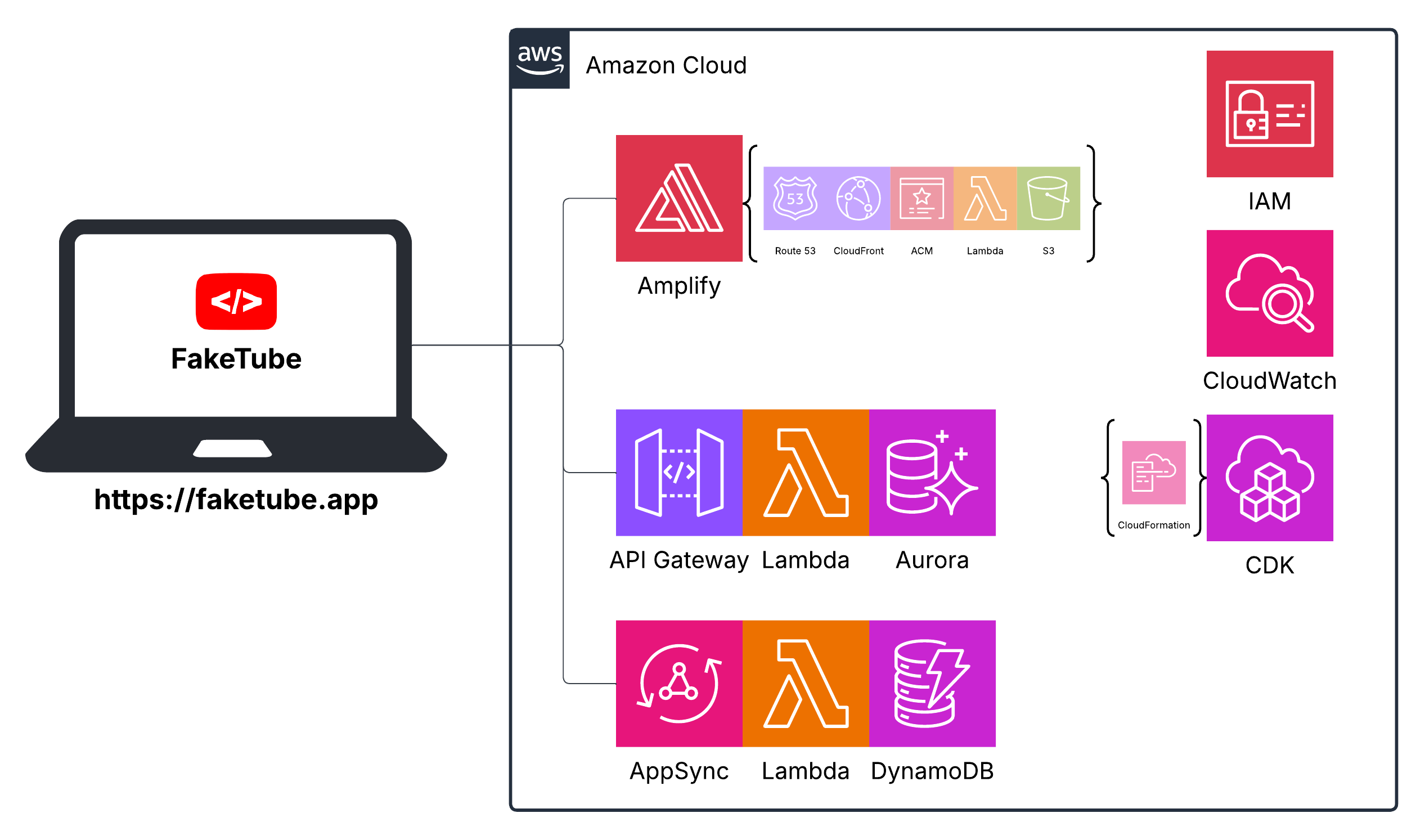
Our high-level architecture diagram will now evolve to incorporate these new GraphQL components - AppSync, DynamoDB and (optional) Lambda function.
The sequence diagram is worth a thousand words. This high level diagram shows two variants of our architecture:
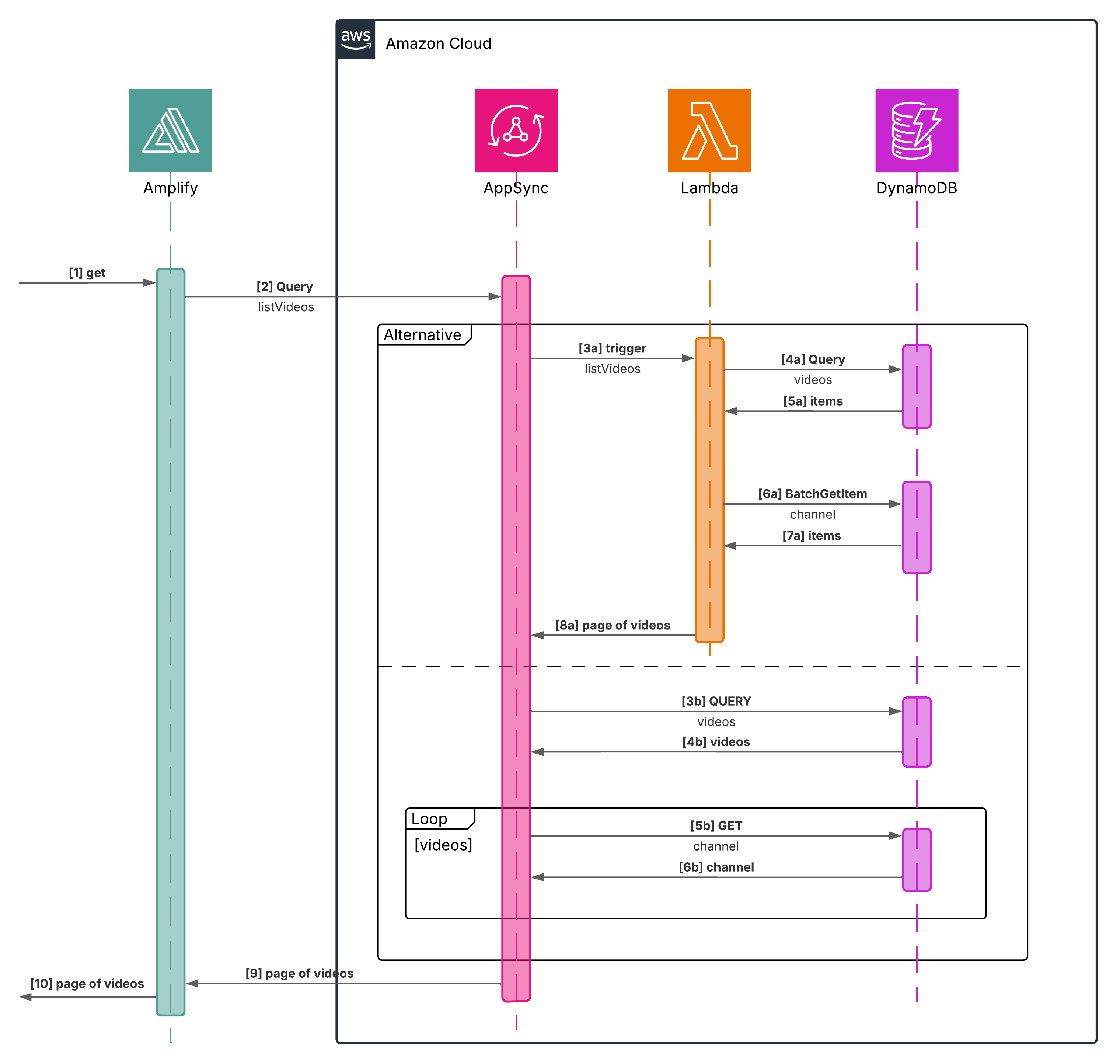
- Lambda resolver as an intermediary between AppSync and DynamoDB
First it runs DynamoDB Query command to get a paginated list of videos sorted by publishedAt and then runs BatchGetItem query to get channels for those videos and merges the two results.
- DynamoDB resolver to directly integrate AppSync with DynamoDB
First it queries DynamoDB for the paginated list of videos sorted by publishedAt and then it uses a field-level resolver to get the channel for each video.
We will discuss, implement and compare both variants.
Let’s dive in!
Database
For this iteration, we’re moving to a NoSQL database and our solution of choice will be Amazon DynamoDB a key-value database designed for high performance or as AWS put it in the tagline:
Serverless, fully managed, distributed NoSQL database with single-digit millisecond performance at any scale
Before we can store any data, we need a “blueprint”. Just as we defined our relational schema with an ERD (Entity Relationship Diagram) and DDL (Data Definition Language) statements previously, we must now design a schema tailored for our NoSQL database.
Schema
Unlike the rigid structure of relational databases with predefined tables and relationships, NoSQL databases like DynamoDB offer a more flexible model.
Single table design
One of the most powerful and initially counterintuitive concepts in DynamoDB is single-table design . While our relational background taught us to normalize data into separate tables (like videos and channels), with this approach, we’ll store different types of items within a single table.
DynamoDB does not support the complex join operations that are fundamental to relational databases like PostgreSQL. This absence of joins is a key motivator for the single-table design pattern.
By leveraging generic primary keys like PK (Partition Key), SK (Sort Key) and additional indexes like GSI (Global Secondary Indexes) or LSI (Local Secondary Indexes), we can efficiently model relationships between data and create highly performant queries.
I highly recommend watching Fundamentals of Amazon DynamoDB Single Table Design with Rick Houlihan to better understand the modelling process.
ERD (Entity Relationship Diagram)
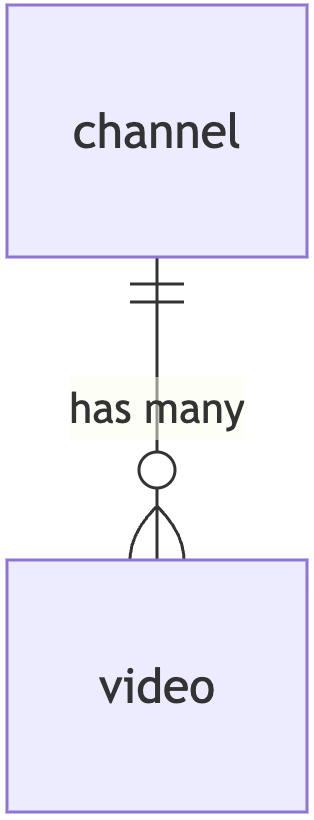
As a first step, let’s visualize our (super simple) ERD diagram and the relationship between videos and channels using Mermaid ERD (Entity Relationship Diagram)
cloud/lib/dynamodb-erd.md
Access patterns
Now, let’s try to identify all the access patterns for the Home page feature (plus let’s think also about the incoming Watch page feature).
| Identified Access Patterns | Feature |
|---|---|
Get all videos sorted by publishedAt | Home page |
Get channel by channelId | Home page |
Get video by videoId | Watch page |
Let’s also go through all those access patterns and think which Table, GSI (Global Secondary Index) or LSI (Local Secondary Index) we have to query to get a given result. What are the key conditions or filter expressions needed?
| Access Pattern | Table/GSI/LSI | Key Condition |
|---|---|---|
Get all videos sorted by publishedAt | GSI1 | GSI1_PK=“video” |
Get channel by channelId | Table | PK=channelId and SK=channelId Example PK=“c#AmazonNovaReel” and SK=“c#AmazonNovaReel” |
Get video by videoId | Table | PK=videoId and SK=videoId Example PK=“v#q9Gm7a6Wwjk” and SK=“v#q9Gm7a6Wwjk” |
NoSQL Workbench
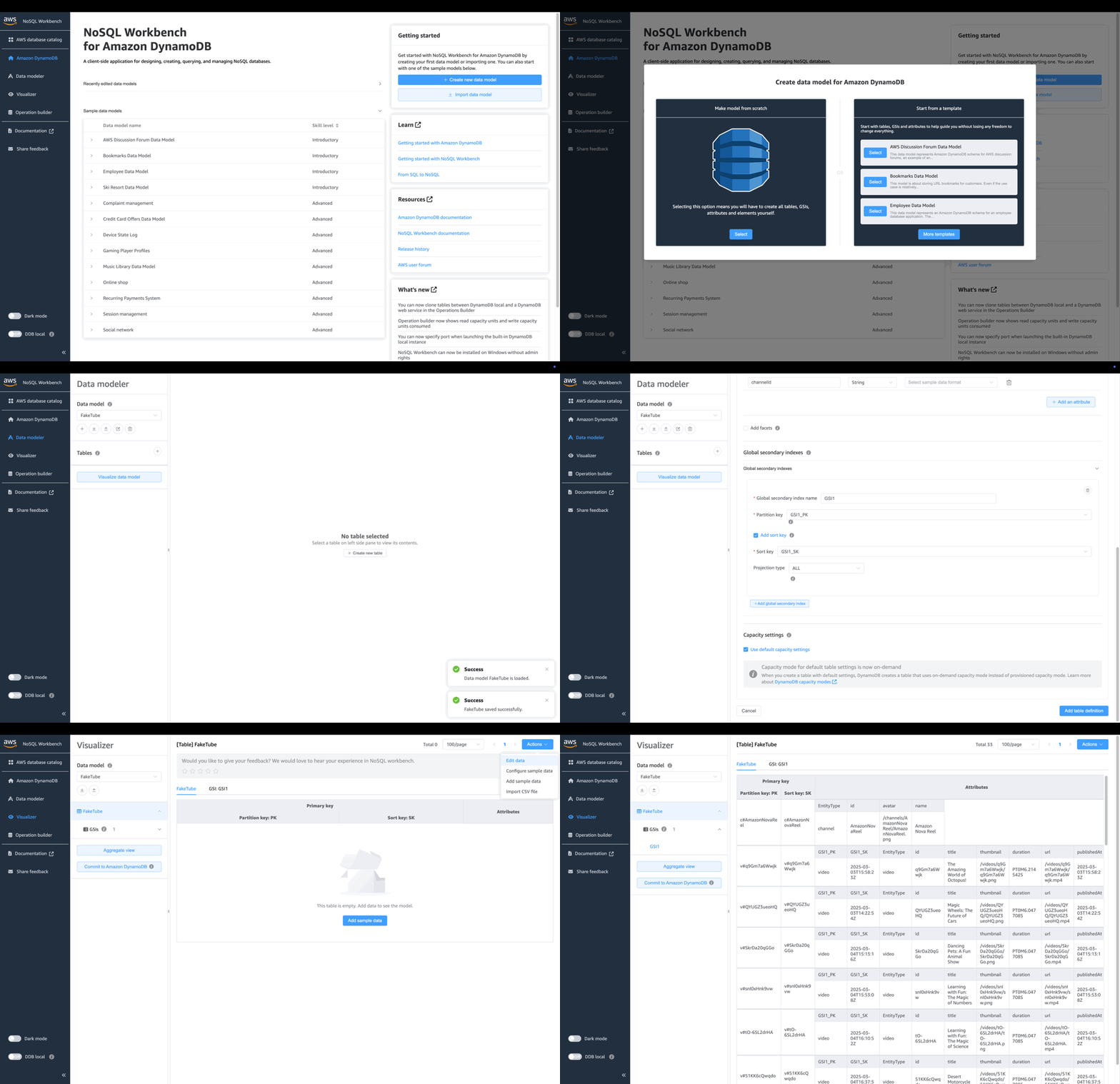
Let’s create the data model in NoSQL Workbench for DynamoDB - cross-platform GUI application that you can use for modern database development and operations.
Data model
Click “Create new data model” from the “Getting started” section on the top-right. Click “Select” from the “Make model from scratch” section on the left. Fill out the form like this:
| Field | Value |
|---|---|
| Name | CodeTube |
| Author | Jacek Kościesza |
| Description | YouTube clone |
and finally click the “Create” button.
DynamoDB table
Now let’s create a DynamoDB table. Click the “Create new table” button from the “No table selected” section located in the centre.
Complete the form as follows:
| Table name | CodeTube |
In the “Primary key attributes” section check “Add sort key” option and define both - partition and sort keys:
| Partition key | PK | String |
| Sort key | SK | String |
In the “Other attributes” click “Add an attribute” button and create all the needed attributes:
| Attribute name | Attribute type |
|---|---|
| GSI1_PK | String |
| GSI1_SK | String |
| EntityType | String |
| id | String |
| avatar | String |
| name | String |
| title | String |
| thumbnail | String |
| duration | String |
| url | String |
| publishedAt | String |
| channelId | String |
In the “Global secondary indexes” section click “Add global secondary index”, check “Add sort key” option and fill the form like this:
| Global secondary index name | GSI1 |
| Partition key | GSI1_PK |
| Sort key | GSI1_SK |
| Projection type | ALL |
Finally click the “Add table definition” button.
Here’s that exported data model after those steps:
cloud/lib/NoSQL_Workbench_model_#1.json
{
  "ModelName": "FakeTube",
  "ModelMetadata": {
    "Author": "Jacek Kościesza",
    "DateCreated": "Sep 23, 2025, 06:15 PM",
    "DateLastModified": "Sep 23, 2025, 06:28 PM",
    "Description": "YouTube clone",
    "AWSService": "Amazon DynamoDB",
    "Version": "3.0"
  },
  "DataModel": [
    {
      "TableName": "FakeTube",
      "KeyAttributes": {
        "PartitionKey": {
          "AttributeName": "PK",
          "AttributeType": "S"
        },
        "SortKey": {
          "AttributeName": "SK",
          "AttributeType": "S"
        }
      },
      "NonKeyAttributes": [
        {
          "AttributeName": "GSI1_PK",
          "AttributeType": "S"
        },
        {
          "AttributeName": "GSI1_SK",
          "AttributeType": "S"
        },
        {
          "AttributeName": "EntityType",
          "AttributeType": "S"
        },
        {
          "AttributeName": "id",
          "AttributeType": "S"
        },
        {
          "AttributeName": "avatar",
          "AttributeType": "S"
        },
        {
          "AttributeName": "name",
          "AttributeType": "S"
        },
        {
          "AttributeName": "title",
          "AttributeType": "S"
        },
        {
          "AttributeName": "thumbnail",
          "AttributeType": "S"
        },
        {
          "AttributeName": "duration",
          "AttributeType": "S"
        },
        {
          "AttributeName": "url",
          "AttributeType": "S"
        },
        {
          "AttributeName": "publishedAt",
          "AttributeType": "S"
        },
        {
          "AttributeName": "channelId",
          "AttributeType": "S"
        }
      ],
      "GlobalSecondaryIndexes": [
        {
          "IndexName": "GSI1",
          "KeyAttributes": {
            "PartitionKey": {
              "AttributeName": "GSI1_PK",
              "AttributeType": "S"
            },
            "SortKey": {
              "AttributeName": "GSI1_SK",
              "AttributeType": "S"
            }
          },
          "Projection": {
            "ProjectionType": "ALL"
          }
        }
      ],
      "DataAccess": {
        "MySql": {}
      },
      "SampleDataFormats": {},
      "BillingMode": "PAY_PER_REQUEST"
    }
  ]
}
Data
Now let’s add some data. Click the “Visualizer” tab in the side menu, then click the “Actions” button in the top-right corner and select the “Edit data” option.
We will start with minimalistic example with only one channel and one video:
| Attribute name | Attribute value |
|---|---|
| PK | c#AmazonNovaReel |
| SK | c#AmazonNovaReel |
| EntityType | channel |
| id | AmazonNovaReel |
| avatar | /channels/AmazonNovaReel/AmazonNovaReel.png |
| name | Amazon Nova Reel |
| Attribute name | Attribute value |
|---|---|
| PK | v#q9Gm7a6Wwjk |
| SK | v#q9Gm7a6Wwjk |
| GSI1_PK | video |
| GSI1_SK | 2025-03-03T15:58:23Z |
| EntityType | video |
| title | The Amazing World of Octopus! |
| thumbnail | /videos/q9Gm7a6Wwjk/q9Gm7a6Wwjk.png |
| duration | /videos/q9Gm7a6Wwjk/q9Gm7a6Wwjk.mp4 |
| publishedAt | 2025-03-03T15:58:23Z |
| channelId | AmazonNovaReel |
Here’s how our exported data model changed after those steps:
cloud/lib/NoSQL_Workbench_model_#2.json (diff)
...
      "GlobalSecondaryIndexes": [
        {
          "IndexName": "GSI1",
          "KeyAttributes": {
            "PartitionKey": {
              "AttributeName": "GSI1_PK",
              "AttributeType": "S"
            },
            "SortKey": {
              "AttributeName": "GSI1_SK",
              "AttributeType": "S"
            }
          },
          "Projection": {
            "ProjectionType": "ALL"
          }
        }
      ],
+     "TableData": [
+       {
+         "PK": {
+           "S": "c#AmazonNovaReel"
+         },
+         "SK": {
+           "S": "c#AmazonNovaReel"
+         },
+         "EntityType": {
+           "S": "channel"
+         },
+         "id": {
+           "S": "AmazonNovaReel"
+         },
+         "avatar": {
+           "S": "/channels/AmazonNovaReel/AmazonNovaReel.png"
+         },
+         "name": {
+           "S": "Amazon Nova Reel"
+         }
+       },
+       {
+         "PK": {
+           "S": "v#q9Gm7a6Wwjk"
+         },
+         "SK": {
+           "S": "v#q9Gm7a6Wwjk"
+         },
+         "GSI1_PK": {
+           "S": "video"
+         },
+         "GSI1_SK": {
+           "S": "2025-03-03T15:58:23Z"
+         },
+         "EntityType": {
+           "S": "video"
+         },
+         "id": {
+           "S": "q9Gm7a6Wwjk"
+         },
+         "title": {
+           "S": "The Amazing World of Octopus!"
+         },
+         "thumbnail": {
+           "S": "/videos/q9Gm7a6Wwjk/q9Gm7a6Wwjk.png"
+         },
+         "duration": {
+           "S": "PT0M6.214542S"
+         },
+         "url": {
+           "S": "/videos/q9Gm7a6Wwjk/q9Gm7a6Wwjk.mp4"
+         },
+         "publishedAt": {
+           "S": "2025-03-03T15:58:23Z"
+         },
+         "channelId": {
+           "S": "AmazonNovaReel"
+         }
+       }
+     ],
      "DataAccess": {
        "MySql": {}
      },
      "SampleDataFormats": {},
      "BillingMode": "PAY_PER_REQUEST"
    }
  ]
}
Finally, let’s add the rest of our videos. You can find the final JSON file with the exported data model here:
cloud/lib/NoSQL_Workbench_model_#3.json
GitHub: feat(home): nosql workbench model (#7)
DynamoDB
Moving on, let’s translate all of that to the AWS CDK construct.
cloud/lib/dynamodb.ts
import * as cdk from "aws-cdk-lib";
import * as dynamodb from "aws-cdk-lib/aws-dynamodb";
import { Construct } from "constructs";

export class DynamoDB extends Construct {
  public table: dynamodb.Table;

  constructor(scope: Construct, id: string) {
    super(scope, id);

    this.table = new dynamodb.Table(this, "dynamodb-table", {
      tableName: "FakeTube",
      partitionKey: {
        name: "PK",
        type: dynamodb.AttributeType.STRING,
      },
      sortKey: {
        name: "SK",
        type: dynamodb.AttributeType.STRING,
      },
      billingMode: dynamodb.BillingMode.PAY_PER_REQUEST,
      removalPolicy: cdk.RemovalPolicy.DESTROY,
    });

    this.table.addGlobalSecondaryIndex({
      partitionKey: { name: "GSI1_PK", type: dynamodb.AttributeType.STRING },
      indexName: "GSI1",
      sortKey: { name: "GSI1_SK", type: dynamodb.AttributeType.STRING },
      projectionType: dynamodb.ProjectionType.ALL,
    });

    new cdk.CfnOutput(this, "DynamoDBTableExport", {
      value: this.table.tableName,
    });
  }
}
It’s worth noting two options, which we didn’t discuss in NoSQL Workbench section.
- billingMode
- Set to PAY_PER_REQUEST, which is a flexible billing option capable of serving requests without capacity planning.
- removalPolicy
- Set to DESTROY, which will delete the table during stack deletion. WARNING: this is fine for development environment, but for production environment we will have to change it to RETAIN or SNAPSHOT
Stack
Now, let’s deploy the stack with our DynamoDB table.
cloud/lib/faketube-stack.ts (diff)
import * as cdk from "aws-cdk-lib";
import { Construct } from "constructs";

import { Aurora } from "./aurora";
+import { DynamoDB } from "./dynamodb";
import { Gateway } from "./gateway";
import { Home } from "./home";
import { VPC } from "./vpc";

export class FakeTubeStack extends cdk.Stack {
  constructor(scope: Construct, id: string, props?: cdk.StackProps) {
    super(scope, id, props);

    const vpc = new VPC(this, "vpc");
    const aurora = new Aurora(this, "aurora", { vpc });
+   new DynamoDB(this, "dynamodb");
    const gateway = new Gateway(this, "gateway");

    new Home(this, "home", {
      aurora,
      gateway,
    });
  }
}
cloud/lib/faketube-stack.ts
import * as cdk from "aws-cdk-lib";
import { Construct } from "constructs";

import { Aurora } from "./aurora";
import { DynamoDB } from "./dynamodb";
import { Gateway } from "./gateway";
import { Home } from "./home";
import { VPC } from "./vpc";

export class FakeTubeStack extends cdk.Stack {
  constructor(scope: Construct, id: string, props?: cdk.StackProps) {
    super(scope, id, props);

    const vpc = new VPC(this, "vpc");
    const aurora = new Aurora(this, "aurora", { vpc });
    new DynamoDB(this, "dynamodb");
    const gateway = new Gateway(this, "gateway");

    new Home(this, "home", {
      aurora,
      gateway,
    });
  }
}
Just a final check with cdk diff what will be created:
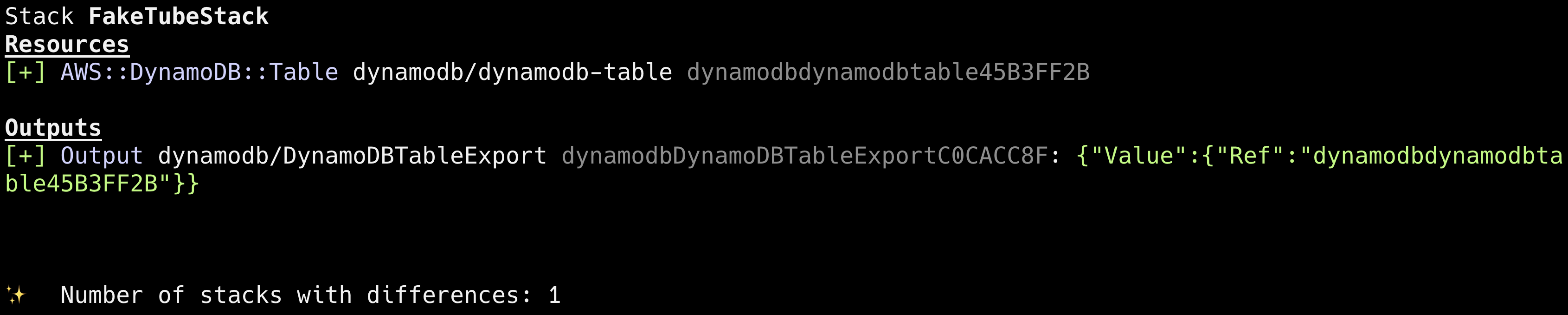
and we can run cdk deploy.
GitHub: feat(home): dynamodb (#7)
Seed
To seed our database with data we will use AWS CLI and batch-write-item command.
Channels
Let’s start with channels. We will first prepare JSON file with PutRequest commands:
cloud/lib/channels.seed.json
{
  "FakeTube": [
    {
      "PutRequest": {
        "Item": {
          "PK": {
            "S": "c#AmazonNovaReel"
          },
          "SK": {
            "S": "c#AmazonNovaReel"
          },
          "EntityType": {
            "S": "channel"
          },
          "id": {
            "S": "AmazonNovaReel"
          },
          "avatar": {
            "S": "/channels/AmazonNovaReel/AmazonNovaReel.png"
          },
          "name": {
            "S": "Amazon Nova Reel"
          }
        }
      }
    }
  ]
}
and we are ready to invoke batch-write-item command:
aws dynamodb batch-write-item --request-items file://lib/channels.seed.json{
"UnprocessedItems": {}
}Tye UnprocessedItems object is empty, which means that everything was processed successfully.
Videos
Next, videos data. We can’t put everything into one big JSON file. We will have to divide it into maximum 25 command chunks, otherwise we will get an error like this:
failed to satisfy constraint: Map value must satisfy constraint: [Member must have length less than or equal to 25, Member must have length greater than or equal to 1]So, let’s create two separate files, first one with 25 commands, second one with 7 commands, which gives our 32 videos in total from the initial video set prepared earlier.
cloud/lib/videos_#1.seed.json
{
  "FakeTube": [
    {
      "PutRequest": {
        "Item": {
          "PK": {
            "S": "v#q9Gm7a6Wwjk"
          },
          "SK": {
            "S": "v#q9Gm7a6Wwjk"
          },
          "GSI1_PK": {
            "S": "video"
          },
          "GSI1_SK": {
            "S": "2025-03-03T15:58:23Z"
          },
          "EntityType": {
            "S": "video"
          },
          "id": {
            "S": "q9Gm7a6Wwjk"
          },
          "title": {
            "S": "The Amazing World of Octopus!"
          },
          "thumbnail": {
            "S": "/videos/q9Gm7a6Wwjk/q9Gm7a6Wwjk.png"
          },
          "duration": {
            "S": "PT0M6.214542S"
          },
          "url": {
            "S": "/videos/q9Gm7a6Wwjk/q9Gm7a6Wwjk.mp4"
          },
          "publishedAt": {
            "S": "2025-03-03T15:58:23Z"
          },
          "channelId": {
            "S": "AmazonNovaReel"
          }
        }
      }
    },
    {
      "PutRequest": {
        "Item": {
          "PK": {
            "S": "v#QYUGZ3ueoHQ"
          },
          "SK": {
            "S": "v#QYUGZ3ueoHQ"
          },
          "GSI1_PK": {
            "S": "video"
          },
          "GSI1_SK": {
            "S": "2025-03-03T14:22:54Z"
          },
          "EntityType": {
            "S": "video"
          },
          "id": {
            "S": "QYUGZ3ueoHQ"
          },
          "title": {
            "S": "Magic Wheels: The Future of Cars"
          },
          "thumbnail": {
            "S": "/videos/QYUGZ3ueoHQ/QYUGZ3ueoHQ.png"
          },
          "duration": {
            "S": "PT0M6.047708S"
          },
          "url": {
            "S": "/videos/QYUGZ3ueoHQ/QYUGZ3ueoHQ.mp4"
          },
          "publishedAt": {
            "S": "2025-03-03T14:22:54Z"
          },
          "channelId": {
            "S": "AmazonNovaReel"
          }
        }
      }
    },
    ... (23 more)
  ]
}
cloud/lib/videos_#2.seed.json
{
  "FakeTube": [
    {
      "PutRequest": {
        "Item": {
          "PK": {
            "S": "v#SJOCLMEuoh0"
          },
          "SK": {
            "S": "v#SJOCLMEuoh0"
          },
          "GSI1_PK": {
            "S": "video"
          },
          "GSI1_SK": {
            "S": "2025-03-07T14:20:26Z"
          },
          "EntityType": {
            "S": "video"
          },
          "id": {
            "S": "SJOCLMEuoh0"
          },
          "title": {
            "S": "Tree Guardians: Protecting Nature's Champions"
          },
          "thumbnail": {
            "S": "/videos/SJOCLMEuoh0/SJOCLMEuoh0.png"
          },
          "duration": {
            "S": "PT0M6.047708S"
          },
          "url": {
            "S": "/videos/SJOCLMEuoh0/SJOCLMEuoh0.mp4"
          },
          "publishedAt": {
            "S": "2025-03-07T14:20:26Z"
          },
          "channelId": {
            "S": "AmazonNovaReel"
          }
        }
      }
    },
    {
      "PutRequest": {
        "Item": {
          "PK": {
            "S": "v#M8V1FcKde2g"
          },
          "SK": {
            "S": "v#M8V1FcKde2g"
          },
          "GSI1_PK": {
            "S": "video"
          },
          "GSI1_SK": {
            "S": "2025-03-07T14:36:03Z"
          },
          "EntityType": {
            "S": "video"
          },
          "id": {
            "S": "M8V1FcKde2g"
          },
          "title": {
            "S": "Street Volunteers: Collecting for a Cause"
          },
          "thumbnail": {
            "S": "/videos/M8V1FcKde2g/M8V1FcKde2g.png"
          },
          "duration": {
            "S": "PT0M6.047708S"
          },
          "url": {
            "S": "/videos/M8V1FcKde2g/M8V1FcKde2g.mp4"
          },
          "publishedAt": {
            "S": "2025-03-07T14:36:03Z"
          },
          "channelId": {
            "S": "AmazonNovaReel"
          }
        }
      }
    },
    ... (5 more)
  ]
}
Let’s invoke batch-write-item commands:
aws dynamodb batch-write-item --request-items file://lib/videos_#1.seed.json{
"UnprocessedItems": {}
}aws dynamodb batch-write-item --request-items file://lib/videos_#2.seed.json{
"UnprocessedItems": {}
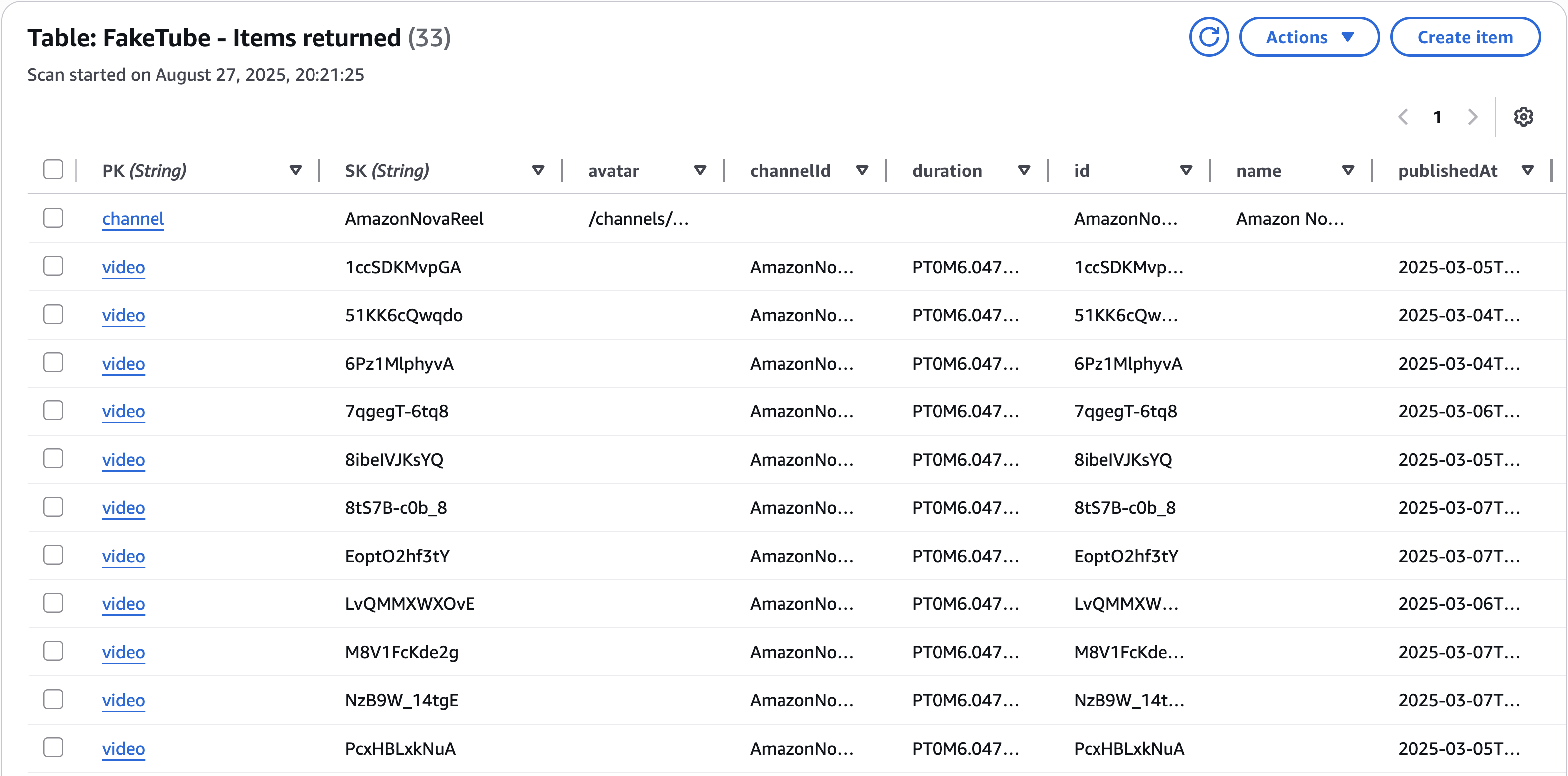
}Seems that it all worked. We can verify it using AWS Console and Explore table items feature:
GitHub: feat(home): dynamodb seed (#7)
API
This time, we’re building our API with GraphQL instead of the traditional REST API. But why?
GraphQL is an open-source query language for APIs and a server-side runtime created by Facebook, open-sourced about 10 years ago. Since then, its adoption and ecosystem have grown immensely. A key difference is that with GraphQL, the client requests exactly the data it needs, solving the common REST problems of over-fetching (getting too much data) and under-fetching (needing multiple requests).
For this project, we’ll use AWS AppSync , a dedicated service on Amazon Web Services that simplifies building a GraphQL API.
Key characteristics of GraphQL:
- Product-centric
- Designed to meet the needs of the client.
- Hierarchical
- Data is structured intuitively, reflecting its relationships.
- Strong-typing
- All data is defined by a schema, ensuring a clear contract.
- Client-specified response
- The client is in control of the data it receives.
- Self-documenting
- The API’s capabilities are automatically known, making it easy to explore and use.
You can dive deeper into its principles on the official Introduction to GraphQL documentation.
Schema
Time to design the API! We’ll do that by defining a GraphQL schema . There are three main operation types supported by GraphQL:
- Query - fetch data from a GraphQL server
- Mutation - modify data with a GraphQL server
- Subscription - get real-time updates from a GraphQL server
The GraphQL type system is extendable and AWS AppSync takes advantage of that by defining its own types like AWSDateTime (which we are going to use). For the complete list see AWS AppSync scalars .
Our tooling will have to be aware of those types, so let’s define those types in the cloud/lib/root.graphql:
type Query
type Mutation
type Subscription

scalar AWSDateTime
With that done, we can now create our own object types like Channel , Video, VideosPage and extend Query type with our own operation like listVideos:
cloud/lib/home/home.graphql
type Channel {
  id: ID!
  avatar: String!
  name: String!
}

type Video {
  id: ID!
  title: String!
  thumbnail: String!
  duration: String!
  url: String!
  publishedAt: AWSDateTime!
  channel: Channel!
}

type VideosPage {
  items: [Video!]!
  nextToken: String
}

extend type Query {
  listVideos(nextToken: String, limit: Int = 24): VideosPage!
}
We will have to merge our schema files into one schema.graphql file, which we will send to AWS AppSync. Lucky for us, there is a CLI tool for that: graphql-schema-utilities .
Let’s install it:
npm install --save-dev graphql-schema-utilitiesand add a graphql command to the package.json which will merge our schema files:
cloud/package.json (diff)
  "scripts": {
    "build": "tsc",
    "watch": "tsc -w",
    "test": "jest",
-   "cdk": "cdk"
+   "cdk": "cdk",
+   "graphql": "rm -f ./lib/schema.graphql && graphql-schema-utilities --includeDirectives --schema \"{root.graphql,./lib/**/*.graphql}\" --output ./lib/schema.graphql"
  },
Now, let’s run it and verify if schema.graphql files was created:
npm run graphqlcloud/lib/schema.graphql
schema {
  query: Query
  mutation: Mutation
  subscription: Subscription
}

scalar AWSDateTime

type Channel {
  id: ID!
  avatar: String!
  name: String!
}

type Mutation

type Query {
  listVideos(nextToken: String, limit: Int = 24): VideosPage!
}

type Subscription

type Video {
  id: ID!
  title: String!
  thumbnail: String!
  duration: String!
  url: String!
  publishedAt: AWSDateTime!
  channel: Channel!
}

type VideosPage {
  items: [Video!]!
  nextToken: String
}
All worked as expected.
GitHub: feat(home): graphql schema (#7)
AppSync
We will now focus on the AWS AppSync - serverless GraphQL and Pub/Sub API. As far as I know it’s a very unique service and there is no direct one-to-one equivalent (in terms of GraphQL features) in other cloud providers like Microsoft Azure or Google Cloud .
Next up, we will define our AppSync construct using AWS CDK :
cloud/lib/appsync.ts
import * as appsync from "aws-cdk-lib/aws-appsync";
import * as cdk from "aws-cdk-lib";
import * as path from "path";
import { Construct } from "constructs";

import { DynamoDB } from "./dynamodb";

interface Props extends cdk.StackProps {
  dynamodb: DynamoDB;
}

export class AppSync extends Construct {
  public api: appsync.GraphqlApi;
  public dynamodbDS: appsync.DynamoDbDataSource;

  constructor(scope: Construct, id: string, { dynamodb }: Props) {
    super(scope, id);

    this.api = new appsync.GraphqlApi(this, "appsync-graphql-api", {
      name: "faketube",
      definition: appsync.Definition.fromFile(
        path.join(__dirname, "schema.graphql")
      ),
      authorizationConfig: {
        defaultAuthorization: {
          authorizationType: appsync.AuthorizationType.API_KEY,
          apiKeyConfig: {
            expires: cdk.Expiration.after(cdk.Duration.days(365)),
          },
        },
      },
    });

    this.dynamodbDS = this.api.addDynamoDbDataSource(
      "faketube",
      dynamodb.table
    );

    new cdk.CfnOutput(this, "GraphQLUrlExport", {
      value: this.api.graphqlUrl,
    });

    new cdk.CfnOutput(this, "GraphQLApiKeyExport", {
      value: this.api.apiKey || "",
    });
  }
}
It’s not very complicated, two things worth noting:
- definition
- Set to our merged schema definition file
schema.graphql - authorizationConfig
- Set default authorization to API Keys. WARNING: we set expiration time of our API Key to 365 days, which is fine for our experiments, but can introduce a security vulnerability for the production environment, so we will have to fix that later
- dynamodbDS
- We also defined DynamoDB data source, which we will use to create our DynamoDB resolvers
Stack
Time to add our AppSync construct to the stack and deploy it.
cloud/lib/faketube-stack.ts (diff)
import * as cdk from "aws-cdk-lib";
import { Construct } from "constructs";

+import { AppSync } from "./appsync";
import { Aurora } from "./aurora";
import { DynamoDB } from "./dynamodb";
import { Gateway } from "./gateway";
import { Home } from "./home";
import { VPC } from "./vpc";

export class FakeTubeStack extends cdk.Stack {
  constructor(scope: Construct, id: string, props?: cdk.StackProps) {
    super(scope, id, props);

    const vpc = new VPC(this, "vpc");
    const aurora = new Aurora(this, "aurora", { vpc });
-   new DynamoDB(this, "dynamodb");
+   const dynamodb = new DynamoDB(this, "dynamodb");
    const gateway = new Gateway(this, "gateway");
+   new AppSync(this, "appsync", { dynamodb });

    new Home(this, "home", {
      aurora,
      gateway,
    });
  }
}
cdk diff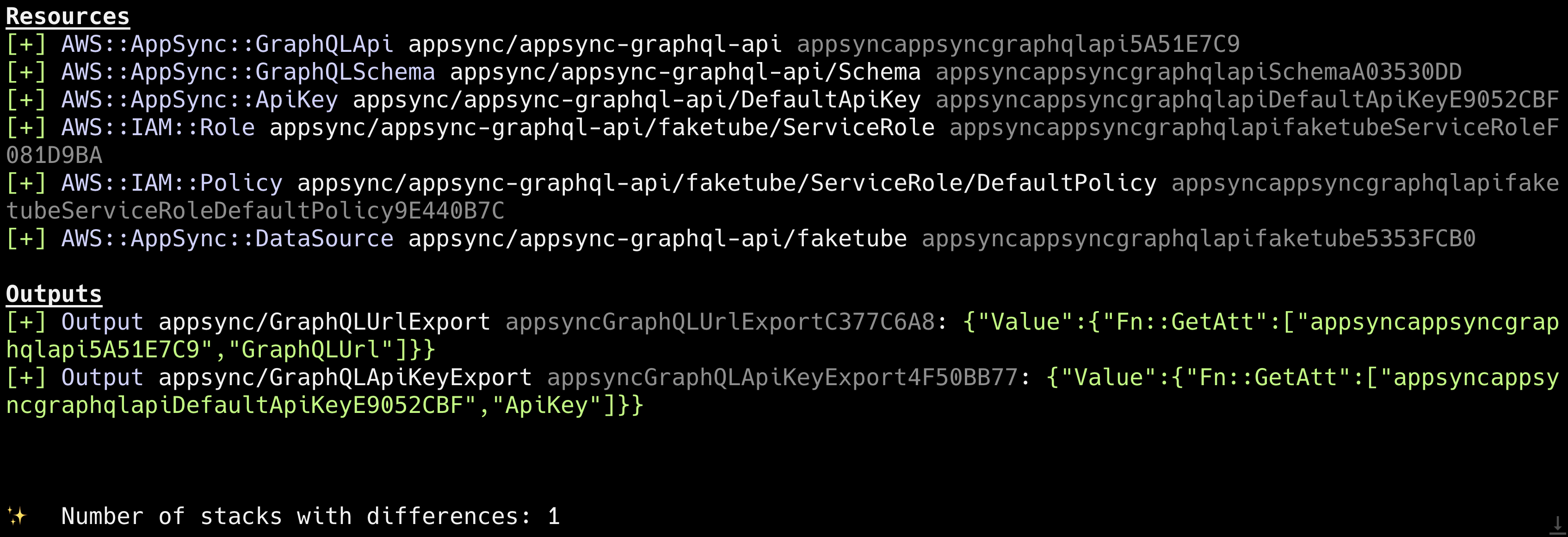
cdk deploy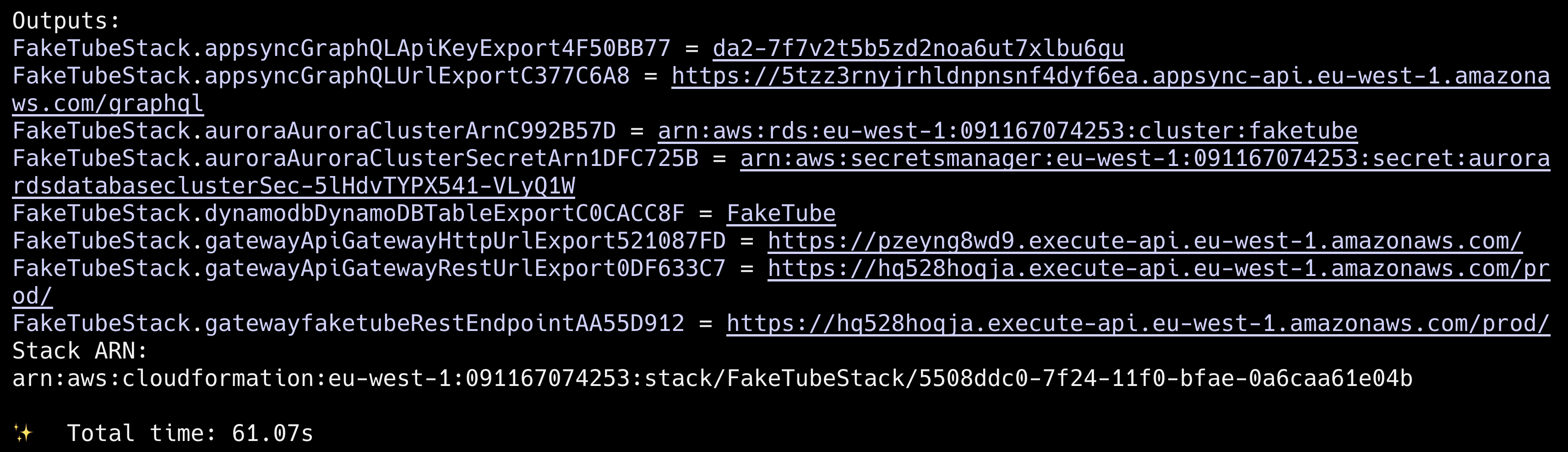
Good time to save our exported outputs from the stack (API Key and GraphQL endpoint URL) as environment variables.
export FAKETUBE_AWS_APPSYNC_GRAPHQL_API_KEY=da2-7f7v2t5b5zd2noa6ut7xlbu6gu
export FAKETUBE_AWS_APPSYNC_GRAPHQL_ENDPOINT=https://5tzz3rnyjrhldnpnsnf4dyf6ea.appsync-api.eu-west-1.amazonaws.com/graphql
GitHub: feat(home): appsync (#7)
Home
Our next step is to create two variants of our architecture, highlighted in the sequence diagram from the introduction section:
- DynamoDB resolver
- Lambda resolver
DynamoDB resolver
cloud/lib/home/home.ts (diff)
import * as apigw from "aws-cdk-lib/aws-apigateway";
import * as path from "path";
import * as lambda from "aws-cdk-lib/aws-lambda";
import * as apigwv2 from "aws-cdk-lib/aws-apigatewayv2";
import { Construct } from "constructs";
import { HttpLambdaIntegration } from "aws-cdk-lib/aws-apigatewayv2-integrations";

+import { AppSync } from "../appsync";
+import { AppsyncResolver } from "../appsyncResolver";
import { Aurora } from "../aurora";
import { Gateway } from "../gateway";
import { Lambda } from "../lambda";

interface Props {
+ appsync: AppSync;
  aurora: Aurora;
  gateway: Gateway;
}

export class Home extends Construct {
-  constructor(scope: Construct, id: string, { aurora, gateway }: Props) {
+  constructor(
+    scope: Construct,
+    id: string,
+    { appsync, aurora, gateway }: Props
+  ) {
    super(scope, id);

    const listVideosLambda = new Lambda(this, "listVideos", {
      name: "listVideos",
      description: "Retrieve a paginated list of videos",
      entry: path.join(__dirname, "functions", "listVideos.lambda.ts"),
      environment: {
        SERVICE_NAME: "Home",
        LOG_LEVEL: "INFO",
        AURORA_SECRET_ARN: aurora.credentials.secretArn,
        AURORA_CLUSTER_ARN: aurora.cluster.clusterArn,
        AURORA_DATABASE_NAME: aurora.defaultName,
      },
    });
    aurora.cluster.grantDataApiAccess(listVideosLambda.function);

+   this.dynamodbResolver(appsync);
    this.rest(gateway.rest, listVideosLambda.function);
    this.http(gateway.http, listVideosLambda.function);
  }

+  dynamodbResolver(appsync: AppSync): void {
+    new AppsyncResolver(this, "listVideosResolver", {
+      name: "listVideos",
+      typeName: "Query",
+      entry: path.join(__dirname, "resolvers", "listVideos.resolver.js"),
+      appsync,
+    });
+
+    new AppsyncResolver(this, "getChannelResolver", {
+      name: "channel",
+      typeName: "Video",
+      entry: path.join(__dirname, "resolvers", "getChannel.resolver.js"),
+      appsync,
+    });
+  }

  rest(rest: apigw.RestApi, handler: lambda.IFunction): void {
    const videos = rest.root.addResource("videos", {
      defaultCorsPreflightOptions: {
        allowHeaders: apigw.Cors.DEFAULT_HEADERS,
        allowMethods: ["GET", "OPTIONS"],
        allowOrigins: this.node.tryGetContext("corsOrigins") || [],
      },
    });

    videos.addMethod("GET", new apigw.LambdaIntegration(handler));
  }

  http(http: apigwv2.HttpApi, handler: lambda.IFunction): void {
    const integration = new HttpLambdaIntegration("VideosIntegration", handler);

    http.addRoutes({
      path: "/videos",
      methods: [apigwv2.HttpMethod.GET],
      integration,
    });
  }
}
We actually create two resolvers here. One is listVideos query resolvers and second one is channel field resolver. In order to reduce a boilerplate, we also created AppsyncResolver helper construct, which looks like this:
cloud/lib/appsyncResolver.ts
import * as aws_appsync from "aws-cdk-lib/aws-appsync";
import { Construct } from "constructs";

import { AppSync } from "./appsync";

interface Props {
  name: string;
  typeName: string;
  entry: string;
  appsync: AppSync;
  dataSource?: aws_appsync.BaseDataSource;
}

export class AppsyncResolver extends Construct {
  public resolver: aws_appsync.Resolver;

  constructor(
    scope: Construct,
    id: string,
    { name, typeName, entry, appsync, dataSource }: Props
  ) {
    super(scope, id);

    this.resolver = new aws_appsync.Resolver(this, name, {
      api: appsync.api,
      fieldName: name,
      typeName,
      dataSource: dataSource || appsync.dynamodbDS,
      code: aws_appsync.Code.fromAsset(entry),
      runtime: aws_appsync.FunctionRuntime.JS_1_0_0,
    });
  }
}
Those (listVideos and getChannel) are JavaScript resolvers , which are defined like this:
cloud/lib/home/resolvers/listVideos.resolver.js
import * as ddb from "@aws-appsync/utils/dynamodb";

export function request(ctx) {
  const nextToken = ctx.args.nextToken;
  const limit = ctx.args.limit;

  return ddb.query({
    query: {
      GSI1_PK: { eq: "video" },
    },
    index: "GSI1",
    scanIndexForward: true,
    limit,
    nextToken,
  });
}

export function response(ctx) {
  if (ctx.error) {
    util.error(ctx.error.message, ctx.error.type);
  }

  const videos = ctx.result.items || [];
  const nextToken = ctx.result.nextToken;

  const page = {
    items: videos,
    nextToken,
  };

  return page;
}
cloud/lib/home/resolvers/getChannel.resolver.js
import { get } from "@aws-appsync/utils/dynamodb";
import { util } from "@aws-appsync/utils";

export function request(ctx) {
  const channelId = ctx.source.channelId;

  return get({
    key: {
      PK: `c#${channelId}`,
      SK: `c#${channelId}`,
    },
  });
}

export function response(ctx) {
  if (ctx.error) {
    util.error(ctx.error.message, ctx.error.type);
  }

  const channel = ctx.result;

  return channel;
}
As a final step, let’s update our stack, deploy it and test our GraphQL API using cURL .
cloud/faketube-stack.ts (diff)
import * as cdk from "aws-cdk-lib";
import { Construct } from "constructs";

import { AppSync } from "./appsync";
import { Aurora } from "./aurora";
import { DynamoDB } from "./dynamodb";
import { Gateway } from "./gateway";
import { Home } from "./home";
import { VPC } from "./vpc";

export class FakeTubeStack extends cdk.Stack {
  constructor(scope: Construct, id: string, props?: cdk.StackProps) {
    super(scope, id, props);

    const vpc = new VPC(this, "vpc");
    const aurora = new Aurora(this, "aurora", { vpc });
    const dynamodb = new DynamoDB(this, "dynamodb");
    const gateway = new Gateway(this, "gateway");
-   new AppSync(this, "appsync", { dynamodb });
+   const appsync = new AppSync(this, "appsync", { dynamodb });

    new Home(this, "home", {
+     appsync,
      aurora,
      gateway,
    });
  }
}
cdk diff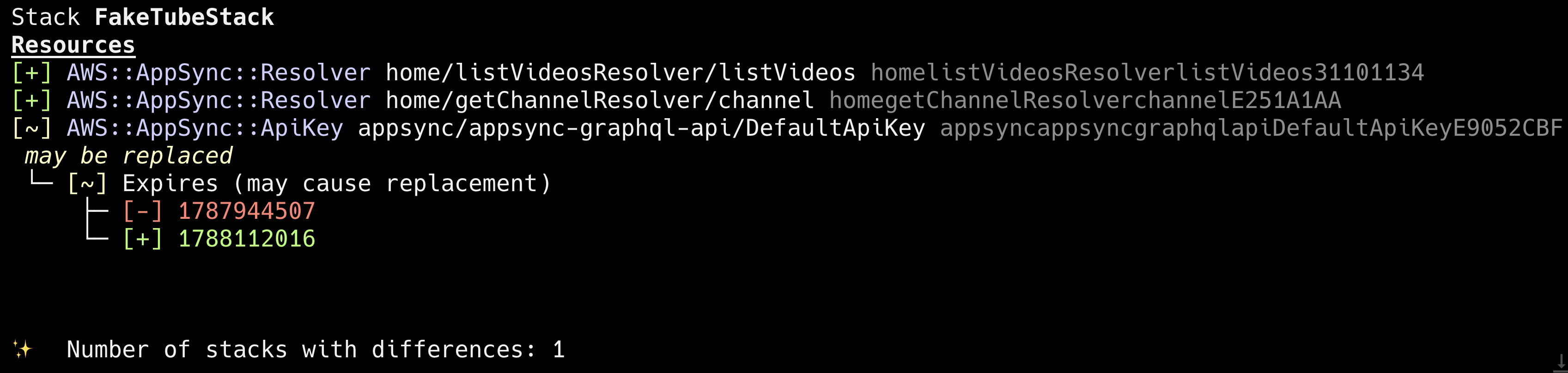
cdk deployTo test our API we will send a listVideos query like this:
curl -X POST \
  -H "Content-Type: application/json" \
  -H "x-api-key: $FAKETUBE_AWS_APPSYNC_GRAPHQL_API_KEY" \
  -d '{
    "query": "query ListVideos($limit: Int) { page: listVideos(limit: $limit) { items { id title thumbnail duration url publishedAt channel { id avatar name } } nextToken } }",
    "variables": {
      "limit": 2
    }
  }' \
  $FAKETUBE_AWS_APPSYNC_GRAPHQL_ENDPOINT | jq
Here’s the result:
{
  "data": {
    "page": {
      "items": [
        {
          "id": "1ccSDKMvpGA",
          "title": "Exploring the Magic of Motorhomes",
          "thumbnail": "/videos/1ccSDKMvpGA/1ccSDKMvpGA.png",
          "duration": "PT0M6.047708S",
          "url": "/videos/1ccSDKMvpGA/1ccSDKMvpGA.mp4",
          "publishedAt": "2025-03-05T16:01:54Z",
          "channel": {
            "id": "AmazonNovaReel",
            "avatar": "/channels/AmazonNovaReel/AmazonNovaReel.png",
            "name": "Amazon Nova Reel"
          }
        },
        {
          "id": "51KK6cQwqdo",
          "title": "Desert Motorcycle Adventure",
          "thumbnail": "/videos/51KK6cQwqdo/51KK6cQwqdo.png",
          "duration": "PT0M6.047708S",
          "url": "/videos/51KK6cQwqdo/51KK6cQwqdo.mp4",
          "publishedAt": "2025-03-04T16:37:57Z",
          "channel": {
            "id": "AmazonNovaReel",
            "avatar": "/channels/AmazonNovaReel/AmazonNovaReel.png",
            "name": "Amazon Nova Reel"
          }
        }
      ],
      "nextToken": "eyJ2ZXJzaW9uIjozLCJ0b2tlbiI6IkFnVjQwRkFHKzNjNUNOUGlsdVNJYWJjdUZkTWdLUllEZjNqdWIrUHFSWmtMZ3pnQWV3QUNBQWRCY0hCVGVXNWpBQkZGYm1OeWVYQjBhVzl1UTI5dWRHVjRkQUFWWVhkekxXTnllWEIwYnkxd2RXSnNhV010YTJWNUFFUkJjelZrTVd0U1IxUkRjMjFQU3pkbmJXbGtPRWxWWmtWb1JEZGtXRUpEUjNkbmFFSTFWbTlNU1c1YU9UZE9lVk5PZHpkUFpISktOVmxKTlZkdlZtRnZZMEU5UFFBQkFBZGhkM010YTIxekFFdGhjbTQ2WVhkek9tdHRjenBsZFMxM1pYTjBMVEU2TkRRME5qazNNVEUxTVRRd09tdGxlUzgxTURka1pqQmpOQzFrTW1OaExUUTVPREV0T1RRek1TMDBZbUU0WlRjMlptWTNNRFFBdUFFQ0FRQjQweFhTdzVEZHNVb1NFZ0lQYlkxMnVlcjRTRHo4eGdTWDE4b0RoM3ZlYWtjQlk4M2YxMGh1UnVxQkZGTm11MDQ0MEFBQUFINHdmQVlKS29aSWh2Y05BUWNHb0c4d2JRSUJBREJvQmdrcWhraUc5dzBCQndFd0hnWUpZSVpJQVdVREJBRXVNQkVFRE5MbWprZWEwcms2RlZCN3F3SUJFSUE3U2RwSDcxTCtLc3hUTm4xOWYwdG95SlZBblE3MWNIdXArcVJhQmlLYU5hdENwc2RwcjcxczdCY2hQcmtMZ0NxQ1MwanhnSTJxM0hpcXdMY0NBQUFRQUJwN2NoSVlLREFOYW82dDhIbXkrNS9NQ3RzZHVHT0YwT3V4cEh3Wms1eEQ5Y3Nzbm9XLzdRajc0OFpTRGpDUHkvLy8vLzhBQUFBQkFBQUFBQUFBQUFBQUFBQUJBQUFDQjZkZkRyRHRST05rc2ljTXNPZXFjWHROaXg3Y0NmRDRnNUhlR1dNdFdxRWtUbUkzK2s5U3dRUys3Q3JqRHJvbC9jbEN2VzdOTWNkYW1Pd1FhTXB0QjZmNEdXaExKY0psR2RTWXd5dEhRRE9jdmRRamszcC80a1J5ZUk4MzFsRDNvU0drSjlxSmlHcjk5NTZ4TzN4Z1RVZFRHNGEveDRBTTB1R0UvN0NXZ25YUXRPalM2TGZRZElxRHdNNnFZYlZXSitZTkUrWXM0TnUrVDZOQ0hhd3J3enVJaVJyZTh3bWx4dUo2MnVGY3hIL21Jb3NBRS9IbWxROUlocjd6VXRaSGhBV25lakVON3hGMGhFVHZTenBKRUtxS0JWZ1FQKzBycW9IYUpTY005dUwyTmJpc0phQ3R1TEdLbnRLalZqZHZ5QmR1N2h2OHkzWjBIY3lvVmk4cWViMHQ3K1JkMkNzYVZVTHUwLy9XSlo1c08wUlRXQ3VZUGFhaDFvK3JpbVNFVTlDYnFaZGd1L0FUS2IzdTJBelZ6VHlKWnZKVVhHUEhZNkNkejdKOW93eXJObjA3RWNRTW40VmdqTnVxRzdzdUZWRFBKdmN0MytmeGZaamVXTk1KSzJ1MlkvUC9EZ2d3RUNHbE1MUnVkRkNocWxtSFFkenl4OWV2NlVPNEdMa0E1bW1mN0N2Ymhyek5VSytnL2dXejFPNW5OSHJodUVoeDd0dDlxUEpnblpIUzdUbWpyd3A0U2VHbUpFY1dkWG1FcElBaFF4RjNZN3d6Tm55U1ZCOU1kdFZjNlRxK3hXazZkelBVdnlqWGE2NkJzSkw4bis0aFYrVk4xekpoeWJLeXhMYU9xblZTZldGZE1lRmYxUVFyOHB0STUydllSdjgwdnJFMGhpd24rYXUzS2FIcXFBY3c1emQzSEVRUU8xYVZXeVNCNWR2OFBEZ0FaekJsQWpFQTJHVUVNK2dZakR0QUtvcWdieUZBTnBCKytuK0Fpc3VuZjhiVk9vYkNCck4wODh0Z0VTaW8rT01YeGhZUGF2eEVBakJsRlZZVGVXQ0hNcldiZmcyNkZ1QTdoaVg0QWpEeE5pY2Y1S202K0ZEVnhhcEUzR3lWc0lTVXJpOFJPUTVnV25rPSJ9"
    }
  }
}
GitHub: feat(home): appsync dynamodb resolver (#7)
Lambda resolver
Next, the seconds variant of our architecture, using Lambda resolver.
We will need a separate query for this e.g. listVideosLambdaProxy, so let’s update our GraphQL schema:
cloud/lib/home/home.graphql (diff)
type Channel {
  id: ID!
  avatar: String!
  name: String!
}

type Video {
  id: ID!
  title: String!
  thumbnail: String!
  duration: String!
  url: String!
  publishedAt: AWSDateTime!
  channel: Channel!
}

type VideosPage {
  items: [Video!]!
  nextToken: String
}

extend type Query {
  listVideos(nextToken: String, limit: Int = 24): VideosPage!
+ listVideosProxy(nextToken: String, limit: Int = 24): VideosPage!
}
npm run graphqlWith that done, we can now define our lambda resolver in the Home construct:
cloud/lib/home/home.tsx (diff)
import * as apigw from "aws-cdk-lib/aws-apigateway";
import * as path from "path";
import * as lambda from "aws-cdk-lib/aws-lambda";
import * as apigwv2 from "aws-cdk-lib/aws-apigatewayv2";
import { Construct } from "constructs";
import { HttpLambdaIntegration } from "aws-cdk-lib/aws-apigatewayv2-integrations";

import { AppSync } from "../appsync";
import { AppsyncResolver } from "../appsyncResolver";
import { Aurora } from "../aurora";
import { Gateway } from "../gateway";
import { Lambda } from "../lambda";

interface Props {
  appsync: AppSync;
  aurora: Aurora;
  gateway: Gateway;
}

export class Home extends Construct {
  constructor(
    scope: Construct,
    id: string,
    { appsync, aurora, gateway }: Props
  ) {
    super(scope, id);

    const listVideosLambda = new Lambda(this, "listVideos", {
      name: "listVideos",
      description: "Retrieve a paginated list of videos",
      entry: path.join(__dirname, "functions", "listVideos.lambda.ts"),
      environment: {
        SERVICE_NAME: "Home",
        LOG_LEVEL: "INFO",
        AURORA_SECRET_ARN: aurora.credentials.secretArn,
        AURORA_CLUSTER_ARN: aurora.cluster.clusterArn,
        AURORA_DATABASE_NAME: aurora.defaultName,
      },
    });
    aurora.cluster.grantDataApiAccess(listVideosLambda.function);

    this.dynamodbResolver(appsync);
+   this.lambdaResolver(appsync);
    this.rest(gateway.rest, listVideosLambda.function);
    this.http(gateway.http, listVideosLambda.function);
  }

  dynamodbResolver(appsync: AppSync): void {
    new AppsyncResolver(this, "listVideosResolver", {
      name: "listVideos",
      typeName: "Query",
      entry: path.join(__dirname, "resolvers", "listVideos.resolver.js"),
      appsync,
    });

    new AppsyncResolver(this, "getChannelResolver", {
      name: "channel",
      typeName: "Video",
      entry: path.join(__dirname, "resolvers", "getChannel.resolver.js"),
      appsync,
    });
  }

+  lambdaResolver(appsync: AppSync): void {
+    const listVideosProxyLambda = new Lambda(this, "listVideosProxy", {
+      name: "listVideosProxy",
+      description: "Retrieve a paginated list of videos",
+      entry: path.join(__dirname, "functions", "listVideosProxy.lambda.ts"),
+      environment: {
+        SERVICE_NAME: "Home",
+        LOG_LEVEL: "INFO",
+      },
+    });
+
+    const lambdaDS = appsync.api.addLambdaDataSource(
+      `listVideosProxyDS`,
+      listVideosProxyLambda.function
+    );
+
+    lambdaDS.createResolver("listVideosProxy", {
+      typeName: "Query",
+      fieldName: "listVideosProxy",
+    });
+  }
+
  rest(rest: apigw.RestApi, handler: lambda.IFunction): void {
    const videos = rest.root.addResource("videos", {
      defaultCorsPreflightOptions: {
        allowHeaders: apigw.Cors.DEFAULT_HEADERS,
        allowMethods: ["GET", "OPTIONS"],
        allowOrigins: this.node.tryGetContext("corsOrigins") || [],
      },
    });

    videos.addMethod("GET", new apigw.LambdaIntegration(handler));
  }

  http(http: apigwv2.HttpApi, handler: lambda.IFunction): void {
    const integration = new HttpLambdaIntegration("VideosIntegration", handler);

    http.addRoutes({
      path: "/videos",
      methods: [apigwv2.HttpMethod.GET],
      integration,
    });
  }
}
Now, the lambda boilerplate (known from the previous episode), which will return an empty page of videos (without actually making any DynamoDB requests yet):
cloud/lib/home/functions/listVideosProxy.lambda.ts
import error from "@middy/http-error-handler";
const env = require("middy-env");
import middy from "@middy/core";
import validator from "@middy/validator";
import { AppSyncResolverEvent } from "aws-lambda";
import { captureLambdaHandler } from "@aws-lambda-powertools/tracer/middleware";
import { injectLambdaContext } from "@aws-lambda-powertools/logger/middleware";
import { Logger } from "@aws-lambda-powertools/logger";
import { LogLevel } from "@aws-lambda-powertools/logger/types";
import { logMetrics } from "@aws-lambda-powertools/metrics/middleware";
import { Metrics } from "@aws-lambda-powertools/metrics";
import { Tracer } from "@aws-lambda-powertools/tracer";
import { transpileSchema } from "@middy/validator/transpile";

import { Video } from "../video";
import { Page } from "../page";

const serviceName = process.env.SERVICE_NAME!;
const logLevel = (process.env.LOG_LEVEL || "ERROR") as LogLevel;

const metrics = new Metrics({ namespace: serviceName });
const logger = new Logger({ logLevel, serviceName });
const tracer = new Tracer({ serviceName });

interface Arguments {
  nextToken?: string;
  limit?: number;
}

export const lambdaHandler = async (
  event: AppSyncResolverEvent<Arguments, Page<Video[]>>
) => {
  try {
    console.log("event", JSON.stringify(event));

    const { nextToken, limit } = event.arguments || {};

    const page: Page<Video> = {
      items: [],
    };
    console.log("Page:", page);

    return page;
  } catch (e: any) {
    console.error(e);
    return {
      items: [],
    };
  }
};

const envMap = {
  names: {
    serviceName: ["SERVICE_NAME"],
    logLevel: ["LOG_LEVEL"],
    corsOrigins: ["CORS_ORIGINS"],
  },
};

const eventSchema = {
  type: "object",
  properties: {
    arguments: {
      type: "object",
      properties: {
        nextToken: {
          type: ["string", "null"],
        },
        limit: {
          type: "integer",
          minimum: 1,
        },
      },
      additionalProperties: true,
    },
  },
};

export const handler = middy(lambdaHandler)
  .use(captureLambdaHandler(tracer))
  .use(logMetrics(metrics, { captureColdStartMetric: true }))
  .use(injectLambdaContext(logger, { logEvent: true }))
  .use(env(envMap))
  .use(validator({ eventSchema: transpileSchema(eventSchema) }))
  .use(
    error({ logger: (message) => logger.error("http-error-handler", message) })
  );
The page of videos returned by our Lambda resolver will be a little bit different than that returned by API Gateway. There will be no currentPage and hasNexPage, but a nextToken instead. We have to make those properties optional.
cloud/lib/home.page.ts (diff)
export interface Page<T> {
  items: T[];
- currentPage: number;
+ currentPage?: number;
- hasNextPage: boolean;
+ hasNextPage?: boolean;
+ nextToken?: string;
}
cdk deployTo test our API we will send a listVideosProxy query like this:
curl -X POST \
  -H "Content-Type: application/json" \
  -H "x-api-key: $FAKETUBE_AWS_APPSYNC_GRAPHQL_API_KEY" \
  -d '{
    "query": "query ListVideosProxy($limit: Int) { page: listVideosProxy(limit: $limit) { items { id title thumbnail duration url publishedAt channel { id avatar name } } nextToken } }",
    "variables": {
      "limit": 2
    }
  }' \
  $FAKETUBE_AWS_APPSYNC_GRAPHQL_ENDPOINT | jq
The output is:
{
  "data": {
    "page": {
      "items": [],
      "nextToken": null
    }
  }
}
GitHub: feat(home): appsync lambda resolver boilerplate (#7)
DynamoDB
Finally we have to write real DynamoDB queries in our Lambda function. For that we will need to use two DynamoDB related libraries from the AWS SDK v3 , so let’s install them first:
npm install --save-dev @aws-sdk/client-dynamodb @aws-sdk/lib-dynamodbNow, we are ready to finish the lambda resolver function.
cloud/lib/home/functions/listVideosProxy.lambda.ts (diff)
import error from "@middy/http-error-handler";
const env = require("middy-env");
import middy from "@middy/core";
import validator from "@middy/validator";
import { AppSyncResolverEvent } from "aws-lambda";
import { captureLambdaHandler } from "@aws-lambda-powertools/tracer/middleware";
+import { DynamoDB } from "@aws-sdk/client-dynamodb";
+import { DynamoDBDocument } from "@aws-sdk/lib-dynamodb";
import { injectLambdaContext } from "@aws-lambda-powertools/logger/middleware";
import { Logger } from "@aws-lambda-powertools/logger";
import { LogLevel } from "@aws-lambda-powertools/logger/types";
import { logMetrics } from "@aws-lambda-powertools/metrics/middleware";
import { Metrics } from "@aws-lambda-powertools/metrics";
import { Tracer } from "@aws-lambda-powertools/tracer";
import { transpileSchema } from "@middy/validator/transpile";

+import { Channel } from "../channel";
import { Video } from "../video";
import { Page } from "../page";

const serviceName = process.env.SERVICE_NAME!;
const logLevel = (process.env.LOG_LEVEL || "ERROR") as LogLevel;

const metrics = new Metrics({ namespace: serviceName });
const logger = new Logger({ logLevel, serviceName });
const tracer = new Tracer({ serviceName });

interface Arguments {
  nextToken?: string;
  limit?: number;
}

+const dynamodb = DynamoDBDocument.from(new DynamoDB());
+
export const lambdaHandler = async (
  event: AppSyncResolverEvent<Arguments, Page<Video[]>>
) => {
  try {
    console.log("event", JSON.stringify(event));

    const { nextToken, limit } = event.arguments || {};
+
+   const { Items, LastEvaluatedKey } = await dynamodb.query({
+      TableName: "FakeTube",
+      IndexName: "GSI1",
+      KeyConditions: {
+        GSI1_PK: {
+          ComparisonOperator: "EQ",
+          AttributeValueList: ["video"],
+        },
+      },
+      Limit: limit,
+      ExclusiveStartKey: nextToken ? JSON.parse(nextToken) : undefined,
+    });
+
+    const videos = (Items || []) as VideoItem[];
+
+    const uniqueChannelIds = Array.from(
+      new Set(videos.map((video) => video.channelId))
+    );
+
+    const channels = (
+      await dynamodb.batchGet({
+        RequestItems: {
+          ["FakeTube"]: {
+            Keys: uniqueChannelIds.map((channelId) => ({
+              PK: `c#${channelId}`,
+              SK: `c#${channelId}`,
+            })),
+          },
+        },
+      })
+    ).Responses!["FakeTube"] as Channel[];
+
+    const videosWithChannel: Video[] = videos.map((video) => ({
+      id: video.id,
+      title: video.title,
+      thumbnail: video.thumbnail,
+      duration: video.duration,
+      url: video.url,
+      publishedAt: video.publishedAt,
+      channel: (() => {
+        const c = channels.find((channel) => channel.id === video.channelId)!;
+        return { id: c.id, name: c.name, avatar: c.avatar };
+      })(),
+    }));

    const page: Page<Video> = {
-     items: [],
+     items: (videosWithChannel || []) as Video[],
+     nextToken: LastEvaluatedKey
+       ? JSON.stringify(LastEvaluatedKey)
+       : undefined,
    };
    console.log("Page:", page);

    return page;
  } catch (e: any) {
    console.error(e);
    return {
      items: [],
    };
  }
};

+interface VideoItem {
+  id: string;
+  title: string;
+  thumbnail: string;
+  duration: string;
+  url: string;
+  publishedAt: string;
+  channelId: string;
+}

const envMap = {
  names: {
    serviceName: ["SERVICE_NAME"],
    logLevel: ["LOG_LEVEL"],
    corsOrigins: ["CORS_ORIGINS"],
  },
};

...
cloud/lib/home/home.ts (diff)
import * as apigw from "aws-cdk-lib/aws-apigateway";
import * as path from "path";
import * as lambda from "aws-cdk-lib/aws-lambda";
import * as apigwv2 from "aws-cdk-lib/aws-apigatewayv2";
import { Construct } from "constructs";
import { HttpLambdaIntegration } from "aws-cdk-lib/aws-apigatewayv2-integrations";

import { AppSync } from "../appsync";
import { AppsyncResolver } from "../appsyncResolver";
import { Aurora } from "../aurora";
+import { DynamoDB } from "../dynamodb";
import { Gateway } from "../gateway";
import { Lambda } from "../lambda";

interface Props {
  appsync: AppSync;
  aurora: Aurora;
+ dynamodb: DynamoDB;
  gateway: Gateway;
}

export class Home extends Construct {
  constructor(
    scope: Construct,
    id: string,
-   { appsync, aurora, gateway }: Props
+   { appsync, aurora, dynamodb, gateway }: Props
  ) {
    super(scope, id);

    const listVideosLambda = new Lambda(this, "listVideos", {
      name: "listVideos",
      description: "Retrieve a paginated list of videos",
      entry: path.join(__dirname, "functions", "listVideos.lambda.ts"),
      environment: {
        SERVICE_NAME: "Home",
        LOG_LEVEL: "INFO",
        AURORA_SECRET_ARN: aurora.credentials.secretArn,
        AURORA_CLUSTER_ARN: aurora.cluster.clusterArn,
        AURORA_DATABASE_NAME: aurora.defaultName,
      },
    });
    aurora.cluster.grantDataApiAccess(listVideosLambda.function);

    this.dynamodbResolver(appsync);
-   this.lambdaResolver(appsync);
+   this.lambdaResolver(appsync, dynamodb);
    this.rest(gateway.rest, listVideosLambda.function);
    this.http(gateway.http, listVideosLambda.function);
  }

  dynamodbResolver(appsync: AppSync): void {
    new AppsyncResolver(this, "listVideosResolver", {
      name: "listVideos",
      typeName: "Query",
      entry: path.join(__dirname, "resolvers", "listVideos.resolver.js"),
      appsync,
    });

    new AppsyncResolver(this, "getChannelResolver", {
      name: "channel",
      typeName: "Video",
      entry: path.join(__dirname, "resolvers", "getChannel.resolver.js"),
      appsync,
    });
  }

- lambdaResolver(appsync: AppSync): void {
+ lambdaResolver(appsync: AppSync, dynamodb: DynamoDB): void {
    const listVideosProxyLambda = new Lambda(this, "listVideosProxy", {
      name: "listVideosProxy",
      description: "Retrieve a paginated list of videos",
      entry: path.join(__dirname, "functions", "listVideosProxy.lambda.ts"),
      environment: {
        SERVICE_NAME: "Home",
        LOG_LEVEL: "INFO",
      },
    });
+   dynamodb.table.grantReadData(listVideosProxyLambda.function);

    const lambdaDS = appsync.api.addLambdaDataSource(
      `listVideosProxyDS`,
      listVideosProxyLambda.function
    );

    lambdaDS.createResolver("listVideosProxy", {
      typeName: "Query",
      fieldName: "listVideosProxy",
    });
  }

  rest(rest: apigw.RestApi, handler: lambda.IFunction): void {
    const videos = rest.root.addResource("videos", {
      defaultCorsPreflightOptions: {
        allowHeaders: apigw.Cors.DEFAULT_HEADERS,
        allowMethods: ["GET", "OPTIONS"],
        allowOrigins: this.node.tryGetContext("corsOrigins") || [],
      },
    });

    videos.addMethod("GET", new apigw.LambdaIntegration(handler));
  }

  http(http: apigwv2.HttpApi, handler: lambda.IFunction): void {
    const integration = new HttpLambdaIntegration("VideosIntegration", handler);

    http.addRoutes({
      path: "/videos",
      methods: [apigwv2.HttpMethod.GET],
      integration,
    });
  }
}
cloud/lib/faketube-stack.ts (diff)
import * as cdk from "aws-cdk-lib";
import { Construct } from "constructs";

import { AppSync } from "./appsync";
import { Aurora } from "./aurora";
import { DynamoDB } from "./dynamodb";
import { Gateway } from "./gateway";
import { Home } from "./home";
import { VPC } from "./vpc";

export class FakeTubeStack extends cdk.Stack {
  constructor(scope: Construct, id: string, props?: cdk.StackProps) {
    super(scope, id, props);

    const vpc = new VPC(this, "vpc");
    const aurora = new Aurora(this, "aurora", { vpc });
    const dynamodb = new DynamoDB(this, "dynamodb");
    const gateway = new Gateway(this, "gateway");
    const appsync = new AppSync(this, "appsync", { dynamodb });

    new Home(this, "home", {
      appsync,
      aurora,
+     dynamodb,
      gateway,
    });
  }
}
To test our solution, we have to deploy it, but first let’s temporarily comment out DynamoDB resolver version. It has that channel field resolver which will interfere with our Lambda resolver.
cloud/lib/home/home.ts (diff)
    const listVideosLambda = new Lambda(this, "listVideos", {
      name: "listVideos",
      description: "Retrieve a paginated list of videos",
      entry: path.join(__dirname, "functions", "listVideos.lambda.ts"),
      environment: {
        SERVICE_NAME: "Home",
        LOG_LEVEL: "INFO",
        AURORA_SECRET_ARN: aurora.credentials.secretArn,
        AURORA_CLUSTER_ARN: aurora.cluster.clusterArn,
        AURORA_DATABASE_NAME: aurora.defaultName,
      },
    });
    aurora.cluster.grantDataApiAccess(listVideosLambda.function);

-   this.dynamodbResolver(appsync);
+   // this.dynamodbResolver(appsync);
    this.lambdaResolver(appsync, dynamodb);
    this.rest(gateway.rest, listVideosLambda.function);
    this.http(gateway.http, listVideosLambda.function);
cdk deployTo test our API we will send a listVideosProxy query again:
curl -X POST \
  -H "Content-Type: application/json" \
  -H "x-api-key: $FAKETUBE_AWS_APPSYNC_GRAPHQL_API_KEY" \
  -d '{
    "query": "query ListVideosProxy($limit: Int) { page: listVideosProxy(limit: $limit) { items { id title thumbnail duration url publishedAt channel { id avatar name } } nextToken } }",
    "variables": {
      "limit": 2
    }
  }' \
  $FAKETUBE_AWS_APPSYNC_GRAPHQL_ENDPOINT | jq
This is the outcome:
{
  "data": {
    "page": {
      "items": [
        {
          "id": "QYUGZ3ueoHQ",
          "title": "Magic Wheels: The Future of Cars",
          "thumbnail": "/videos/QYUGZ3ueoHQ/QYUGZ3ueoHQ.png",
          "duration": "PT0M6.047708S",
          "url": "/videos/QYUGZ3ueoHQ/QYUGZ3ueoHQ.mp4",
          "publishedAt": "2025-03-03T14:22:54Z",
          "channel": {
            "id": "AmazonNovaReel",
            "avatar": "/channels/AmazonNovaReel/AmazonNovaReel.png",
            "name": "Amazon Nova Reel"
          }
        },
        {
          "id": "q9Gm7a6Wwjk",
          "title": "The Amazing World of Octopus!",
          "thumbnail": "/videos/q9Gm7a6Wwjk/q9Gm7a6Wwjk.png",
          "duration": "PT0M6.214542S",
          "url": "/videos/q9Gm7a6Wwjk/q9Gm7a6Wwjk.mp4",
          "publishedAt": "2025-03-03T15:58:23Z",
          "channel": {
            "id": "AmazonNovaReel",
            "avatar": "/channels/AmazonNovaReel/AmazonNovaReel.png",
            "name": "Amazon Nova Reel"
          }
        }
      ],
      "nextToken": "{\"GSI1_SK\":\"2025-03-03T15:58:23Z\",\"SK\":\"v#q9Gm7a6Wwjk\",\"PK\":\"v#q9Gm7a6Wwjk\",\"GSI1_PK\":\"video\"}"
    }
  }
}
GitHub: feat(home): appsync lambda resolver dynamodb (#7)
Frontend
The backend part is ready, so we can shift our focus to the frontend. Let’s start with Amplify configuration for GraphQL .
Amplify
We have to add GraphQL endpoint URL and default authentication mode, which will be the API Key.
web/amplify-configuration.ts (diff)
import { ResourcesConfig } from "aws-amplify";

export const config: ResourcesConfig = {
  API: {
    REST: {
      faketubeHttp: {
        region: process.env.NEXT_PUBLIC_FAKETUBE_AWS_REGION!,
        endpoint:
          process.env.NEXT_PUBLIC_FAKETUBE_AWS_API_GATEWAY_HTTP_ENDPOINT!,
      },
      faketubeRest: {
        region: process.env.NEXT_PUBLIC_FAKETUBE_AWS_REGION!,
        endpoint:
          process.env.NEXT_PUBLIC_FAKETUBE_AWS_API_GATEWAY_REST_ENDPOINT!,
      },
    },
+   GraphQL: {
+     endpoint: process.env.NEXT_PUBLIC_FAKETUBE_AWS_APPSYNC_GRAPHQL_ENDPOINT!,
+     apiKey: process.env.NEXT_PUBLIC_FAKETUBE_AWS_APPSYNC_GRAPHQL_API_KEY!,
+     defaultAuthMode: "apiKey",
+   },
  },
};

export default config;
Since we used two new environment variables in the amplify configuration, we have to configure them in .env file. We will also extend our switch for the API type and set it to graphql_dynamodb_resolver (which will be our default variant).
web/.env (diff)
NEXT_PUBLIC_FAKETUBE_AWS_REGION=eu-west-1
NEXT_PUBLIC_FAKETUBE_AWS_API_GATEWAY_REST_ENDPOINT=https://exzg8ug9ya.execute-api.eu-west-1.amazonaws.com/prod
NEXT_PUBLIC_FAKETUBE_AWS_API_GATEWAY_REST_NAME=faketubeRest
NEXT_PUBLIC_FAKETUBE_AWS_API_GATEWAY_HTTP_ENDPOINT=https://po560wpeeg.execute-api.eu-west-1.amazonaws.com
NEXT_PUBLIC_FAKETUBE_AWS_API_GATEWAY_HTTP_NAME=faketubeHttp
+NEXT_PUBLIC_FAKETUBE_AWS_APPSYNC_GRAPHQL_ENDPOINT=https://5tzz3rnyjrhldnpnsnf4dyf6ea.appsync-api.eu-west-1.amazonaws.com/graphql
+NEXT_PUBLIC_FAKETUBE_AWS_APPSYNC_GRAPHQL_API_KEY=da2-7f7v2t5b5zd2noa6ut7xlbu6gu

-# mock | rest | http
+# mock | api_gateway_rest | api_gateway_http | graphql_dynamodb_resolver | graphql_lambda_resolver
-NEXT_PUBLIC_FAKETUBE_API_TYPE_SWITCH=http
+NEXT_PUBLIC_FAKETUBE_API_TYPE_SWITCH=graphql_dynamodb_resolver
Before we forget, let’s also open AWS Console and update environment variables in Amplify Hosting, so that they will be used with the next build.
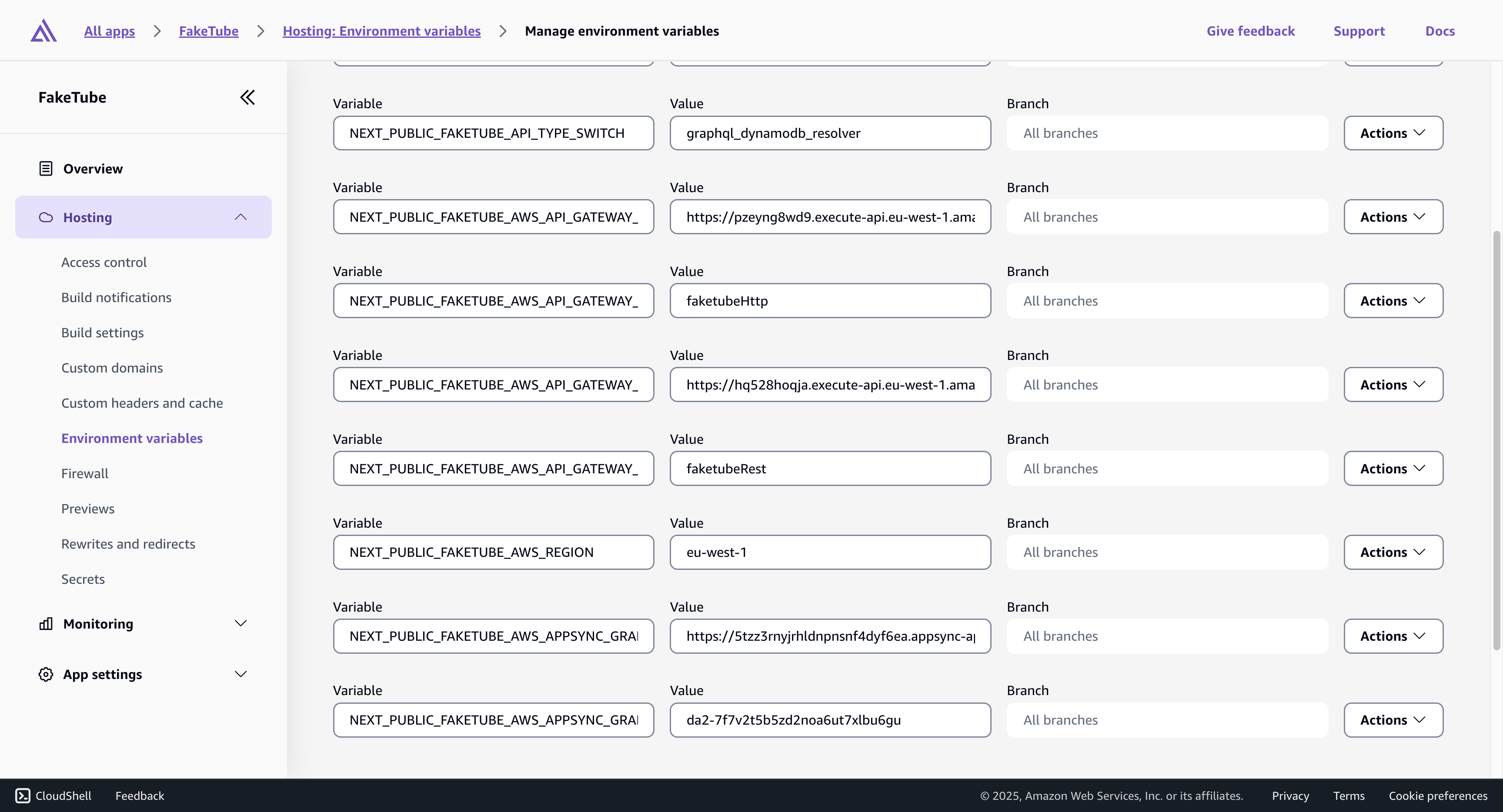
Now, the most important part. Integration with the AppSync based GraphQL API will be in the fetchGraphQL function. We will also add and clean up some logic related to the API type choice (it adds some complexity, but that’s the price for having everything in one place and exploring different possibilities).
cloud/lib/home/useListVideosGraphQL.tsx (diff)
import { get } from "aws-amplify/api";
+import { generateClient } from "aws-amplify/api";
-import { useInfiniteQuery } from "@tanstack/react-query";
+import { InfiniteData, useInfiniteQuery } from "@tanstack/react-query";

import { Page } from "./pagination";
import { Video } from "./video";
import { VIDEOS } from "./videos.data";
+
+const client = generateClient();

export const PAGE_SIZE = 24;
const DELAY_MS = 1000;

const fetchMock = async (
  currentPage: number,
  pageSize: number = PAGE_SIZE
): Promise<Page<Video>> => {
  await new Promise((resolve) => setTimeout(resolve, DELAY_MS));

  const start = currentPage * pageSize;
  const end = start + pageSize;

  return {
    items: VIDEOS.slice(start, end),
    currentPage,
    hasNextPage: end < VIDEOS.length,
  };
};

enum ApiType {
  MOCK = "mock",
- REST = "rest",
- HTTP = "http",
+ API_GATEWAY_REST = "api_gateway_rest",
+ API_GATEWAY_HTTP = "api_gateway_http",
+ GRAPHQL_DYNAMODB_RESOLVER = "graphql_dynamodb_resolver",
+ GRAPHQL_LAMBDA_RESOLVER = "graphql_lambda_resolver",
}

const getApiName = (): string => {
  switch (process.env.NEXT_PUBLIC_FAKETUBE_API_TYPE_SWITCH) {
-   case ApiType.REST:
+   case ApiType.API_GATEWAY_REST:
      return process.env.NEXT_PUBLIC_FAKETUBE_AWS_API_GATEWAY_REST_NAME!;
-   case ApiType.HTTP:
+   case ApiType.API_GATEWAY_HTTP:
      return process.env.NEXT_PUBLIC_FAKETUBE_AWS_API_GATEWAY_HTTP_NAME!;
    default:
      throw new Error("Invalid API switch configuration");
  }
};

const fetchApi = async (
  currentPage: number,
  pageSize: number = PAGE_SIZE
): Promise<Page<Video>> => {
  try {
    const restOperation = get({
      apiName: getApiName(),
      path: "/videos",
      options: {
        queryParams: {
          page: currentPage.toString(),
          pageSize: pageSize.toString(),
        },
      },
    });

    const { body } = await restOperation.response;
    const response = await body.json();

    console.log("Response from API:", response);

    const page = response as unknown as Page<Video>;

    return page;
  } catch (error) {
    console.error("Error fetching videos:", error);
    return {
      items: [],
      currentPage,
      hasNextPage: false,
    };
  }
};

+export const Query = (variant: "" | "Proxy") => `
+  query listVideos${variant}($nextToken: String, $limit: Int) {
+    page: listVideos${variant}(nextToken: $nextToken, limit: $limit) {
+      items {
+        id
+        title
+        thumbnail
+        duration
+        url
+        publishedAt
+        channel {
+          id
+          avatar
+          name
+        }
+      }
+      nextToken
+    }
+  }
+`;
+
+export interface Result {
+  data: {
+    page: Page<Video>;
+  };
+}
+
+const fetchGraphQL = async (
+  nextToken: string | undefined,
+  limit: number = PAGE_SIZE
+) => {
+  try {
+    const result = (await client.graphql({
+      query: Query(
+        process.env.NEXT_PUBLIC_FAKETUBE_API_TYPE_SWITCH ===
+          ApiType.GRAPHQL_LAMBDA_RESOLVER
+          ? "Proxy"
+          : ""
+      ),
+      variables: { nextToken, limit },
+    })) as Result;
+
+    console.log(JSON.stringify(result, null, 2));
+
+    return result?.data.page;
+  } catch (e: unknown) {
+    console.error(e);
+    return {
+      items: [],
+    };
+  }
+};
+
+const fetch = (page: number | undefined | string) => {
+  switch (process.env.NEXT_PUBLIC_FAKETUBE_API_TYPE_SWITCH) {
+    case ApiType.API_GATEWAY_REST:
+    case ApiType.API_GATEWAY_HTTP:
+      return fetchApi(+(page || 0));
+    case ApiType.GRAPHQL_DYNAMODB_RESOLVER:
+    case ApiType.GRAPHQL_LAMBDA_RESOLVER:
+      return fetchGraphQL(page?.toString());
+    default:
+      return fetchMock(+(page || 0));
+  }
+};
+
+const getInitialPageParam = (): number | undefined => {
+  switch (process.env.NEXT_PUBLIC_FAKETUBE_API_TYPE_SWITCH) {
+    case ApiType.GRAPHQL_DYNAMODB_RESOLVER:
+    case ApiType.GRAPHQL_LAMBDA_RESOLVER:
+      return undefined;
+    default:
+      return 0;
+  }
+};
+
+const getNextPageParam = (
+  lastPage: Page<Video>
+): number | undefined | string => {
+  switch (process.env.NEXT_PUBLIC_FAKETUBE_API_TYPE_SWITCH) {
+    case ApiType.GRAPHQL_DYNAMODB_RESOLVER:
+    case ApiType.GRAPHQL_LAMBDA_RESOLVER:
+      return lastPage.nextToken;
+    default:
+      return lastPage.hasNextPage ? lastPage.currentPage! + 1 : undefined;
+  }
+};
+

export const useListVideos = () => {
- return useInfiniteQuery({
+ return useInfiniteQuery<
+   Page<Video>,
+   Error,
+   InfiniteData<Page<Video>, number | undefined | string>,
+   string[],
+   number | undefined | string
+ >({
    queryKey: ["listVideos"],
-   queryFn: ({ pageParam: page }) =>
-     process.env.NEXT_PUBLIC_FAKETUBE_API_TYPE_SWITCH === ApiType.MOCK
-       ? fetchMock(page)
-       : fetchApi(page),
-   initialPageParam: 0,
-   getNextPageParam: (lastPage) =>
-     lastPage.hasNextPage ? lastPage.currentPage + 1 : undefined,
+   queryFn: ({ pageParam: page }) => fetch(page),
+   initialPageParam: getInitialPageParam(),
+   getNextPageParam,
  });
};
cloud/lib/home/useListVideos.tsx
import { get } from "aws-amplify/api";
import { generateClient } from "aws-amplify/api";
import { InfiniteData, useInfiniteQuery } from "@tanstack/react-query";

import { Page } from "./pagination";
import { Video } from "./video";
import { VIDEOS } from "./videos.data";

const client = generateClient();

export const PAGE_SIZE = 24;
const DELAY_MS = 1000;

const fetchMock = async (
  currentPage: number,
  pageSize: number = PAGE_SIZE
): Promise<Page<Video>> => {
  await new Promise((resolve) => setTimeout(resolve, DELAY_MS));

  const start = currentPage * pageSize;
  const end = start + pageSize;

  return {
    items: VIDEOS.slice(start, end),
    currentPage,
    hasNextPage: end < VIDEOS.length,
  };
};

enum ApiType {
  MOCK = "mock",
  API_GATEWAY_REST = "api_gateway_rest",
  API_GATEWAY_HTTP = "api_gateway_http",
  GRAPHQL_DYNAMODB_RESOLVER = "graphql_dynamodb_resolver",
  GRAPHQL_LAMBDA_RESOLVER = "graphql_lambda_resolver",
}

const getApiName = (): string => {
  switch (process.env.NEXT_PUBLIC_FAKETUBE_API_TYPE_SWITCH) {
    case ApiType.API_GATEWAY_REST:
      return process.env.NEXT_PUBLIC_FAKETUBE_AWS_API_GATEWAY_REST_NAME!;
    case ApiType.API_GATEWAY_HTTP:
      return process.env.NEXT_PUBLIC_FAKETUBE_AWS_API_GATEWAY_HTTP_NAME!;
    default:
      throw new Error("Invalid API switch configuration");
  }
};

const fetchApi = async (
  currentPage: number,
  pageSize: number = PAGE_SIZE
): Promise<Page<Video>> => {
  try {
    const restOperation = get({
      apiName: getApiName(),
      path: "/videos",
      options: {
        queryParams: {
          page: currentPage.toString(),
          pageSize: pageSize.toString(),
        },
      },
    });

    const { body } = await restOperation.response;
    const response = await body.json();

    console.log("Response from API:", response);

    const page = response as unknown as Page<Video>;

    return page;
  } catch (error) {
    console.error("Error fetching videos:", error);
    return {
      items: [],
      currentPage,
      hasNextPage: false,
    };
  }
};

export const Query = (variant: "" | "Proxy") => `
  query listVideos${variant}($nextToken: String, $limit: Int) {
    page: listVideos${variant}(nextToken: $nextToken, limit: $limit) {
      items {
        id
        title
        thumbnail
        duration
        url
        publishedAt
        channel {
          id
          avatar
          name
        }
      }
      nextToken
    }
  }
`;

export interface Result {
  data: {
    page: Page<Video>;
  };
}

const fetchGraphQL = async (
  nextToken: string | undefined,
  limit: number = PAGE_SIZE
) => {
  try {
    const result = (await client.graphql({
      query: Query(
        process.env.NEXT_PUBLIC_FAKETUBE_API_TYPE_SWITCH ===
          ApiType.GRAPHQL_LAMBDA_RESOLVER
          ? "Proxy"
          : ""
      ),
      variables: { nextToken, limit },
    })) as Result;

    console.log(JSON.stringify(result, null, 2));

    return result?.data.page;
  } catch (e: unknown) {
    console.error(e);
    return {
      items: [],
    };
  }
};

const fetch = (page: number | undefined | string) => {
  switch (process.env.NEXT_PUBLIC_FAKETUBE_API_TYPE_SWITCH) {
    case ApiType.API_GATEWAY_REST:
    case ApiType.API_GATEWAY_HTTP:
      return fetchApi(+(page || 0));
    case ApiType.GRAPHQL_DYNAMODB_RESOLVER:
    case ApiType.GRAPHQL_LAMBDA_RESOLVER:
      return fetchGraphQL(page?.toString());
    default:
      return fetchMock(+(page || 0));
  }
};

const getInitialPageParam = (): number | undefined => {
  switch (process.env.NEXT_PUBLIC_FAKETUBE_API_TYPE_SWITCH) {
    case ApiType.GRAPHQL_DYNAMODB_RESOLVER:
    case ApiType.GRAPHQL_LAMBDA_RESOLVER:
      return undefined;
    default:
      return 0;
  }
};

const getNextPageParam = (
  lastPage: Page<Video>
): number | undefined | string => {
  switch (process.env.NEXT_PUBLIC_FAKETUBE_API_TYPE_SWITCH) {
    case ApiType.GRAPHQL_DYNAMODB_RESOLVER:
    case ApiType.GRAPHQL_LAMBDA_RESOLVER:
      return lastPage.nextToken;
    default:
      return lastPage.hasNextPage ? lastPage.currentPage! + 1 : undefined;
  }
};

export const useListVideos = () => {
  return useInfiniteQuery<
    Page<Video>,
    Error,
    InfiniteData<Page<Video>, number | undefined | string>,
    string[],
    number | undefined | string
  >({
    queryKey: ["listVideos"],
    queryFn: ({ pageParam: page }) => fetch(page),
    initialPageParam: getInitialPageParam(),
    getNextPageParam,
  });
};
One more small change is needed to the pagination functionality. We already did the same thing for the backend.
web/app/Home/pagination.ts (diff)
export interface Page<T> {
  items: T[];
- currentPage: number;
+ currentPage?: number;
- hasNextPage: boolean;
+ hasNextPage?: boolean;
+ nextToken?: string;
}
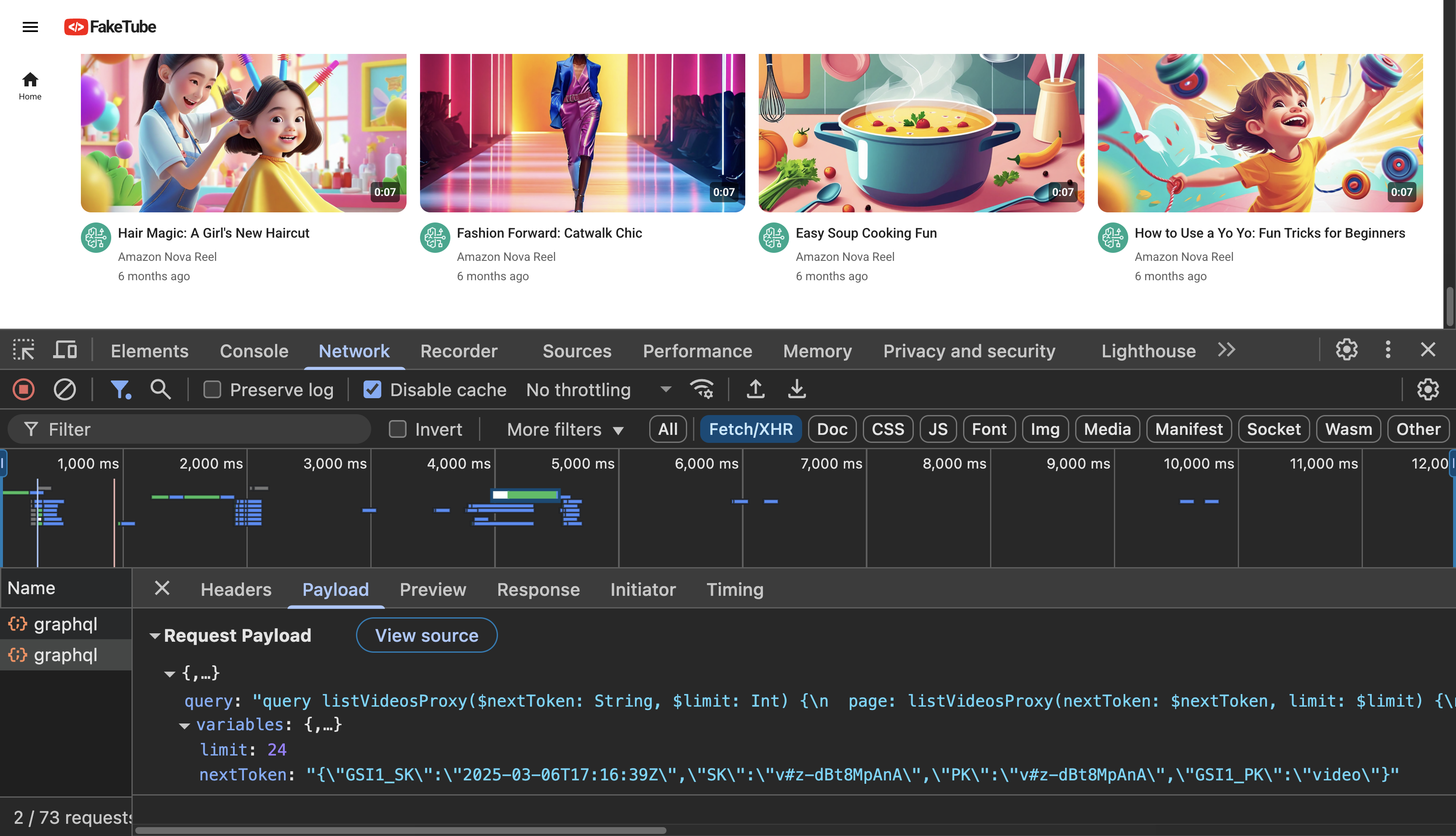
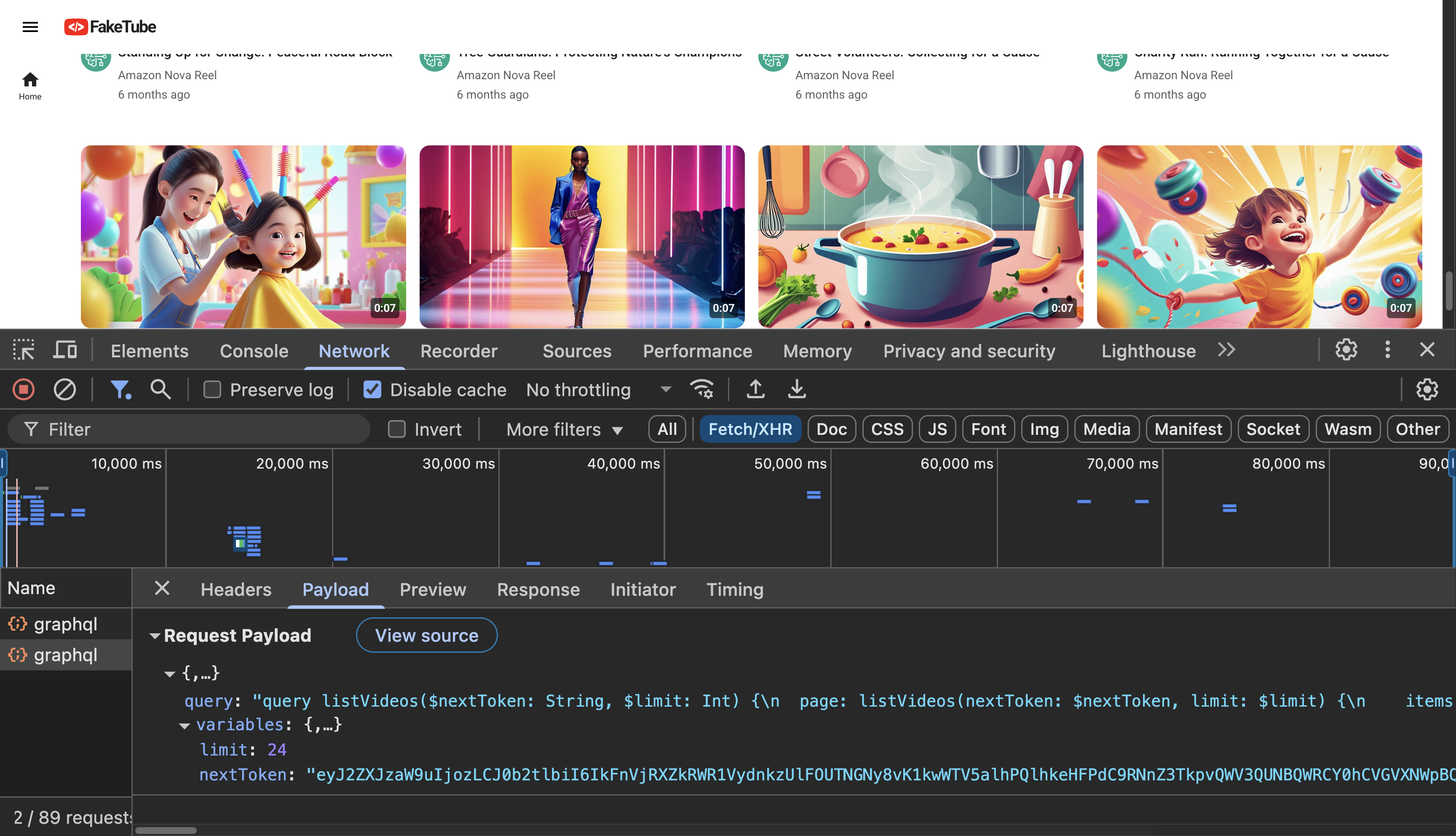
Now we are ready for the end-to-end testing in our browser.
GitHub: feat(home): graphql api integration (#7)
Trademark Notice
It turns out that CodeTube is an already registered trademark . I started a rebranding process, but it will take a while.